






Standard
Most popularOne cent per image. Top up between subscription cycles or bridge a busy month.
$9.99one-time
1,000 credits, 1¢ per image
- 1,000 images keyworded
- Just 1¢ per image
- All 8 supported platforms
- Credits never expire
AutoKeyWorder reads each image, writes the title and keywords, and fills your Adobe Stock or Etsy upload page. About 5 seconds per image.
01How it works
Upload to Adobe Stock, Etsy or any of the other 6 sites the way you already do. The side panel sees which site you are on.

It reads every image in the batch and writes the title, keywords and category to that site’s rules. Add context or tick “Mark as AI-generated” first if you need to.

The fields are filled on the page itself. Read them, change what you want, submit. The extension never submits for you.

02The panel
The extension opens as a side panel next to your upload page. Here is every control in it. On a computer, click one in the panel.
03Video
Buyers search clips by how the camera moves. One frame can’t show that, so AutoKeyWorder measures it.
It takes 30 frames from across the clip and measures how the picture shifts from one to the next: a pan, a tilt, a push in, a pull back, an orbit, a roll.
The move goes to the writer as a verb for the title (“pulling back”) and as the words buyers type into the search on Adobe Stock and Shutterstock. If the keywords come back without them, it can add up to two:
A clip with cuts, or a move it can’t read clearly, gets no motion words at all. A wrong camera move in your keywords is worse than none.
04Try it
Upload your own image. It runs on the same engine the extension uses. 5 free tries, no sign-up.
The extension writes this into the real form on the upload page.
Add to Chrome, free05Proof
Five months of earnings from photos keyworded with AutoKeyWorder, straight from our contributor dashboard.
Autokeyworder is designed for stock content creators who upload images and videos to platforms like Adobe Stock and Shutterstock. This tool automates the process of creating and filling in metadata, including titles, keywords, categories,…
good tools, niceIdaman noor abadi (psyco creator)
good jobAleeza Fatima
good jobHayday
AwesomeErfan
The tool works fine for new photos, but it’s terrible for renaming and retagging old ones on Shutterstock. It wiped out all my existing tags and suggested wrong titles. Absolute waste of $10.
Borja Tomas, Chrome Web Store · Aug 9, 2026
Our answer: existing titles change only when you tick “Overwrite existing titles” in the popup. Re-tagging an old catalog? Try one file first. More in the questions
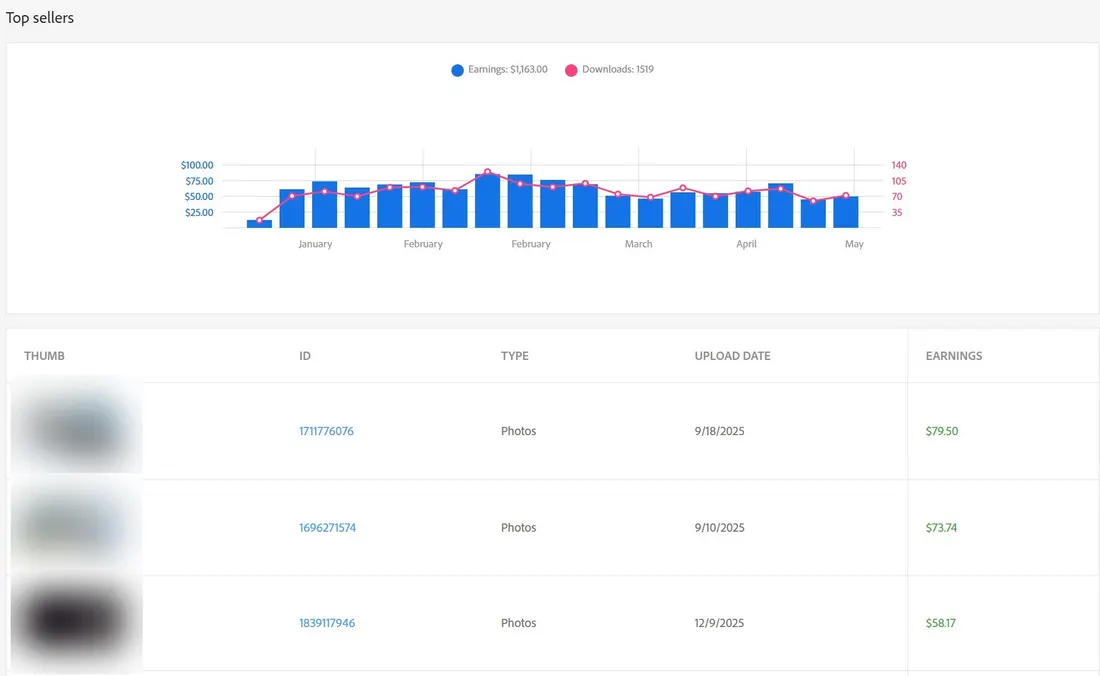
Our Adobe Stock contributor dashboard, captured 2026-05-09. Keyworded with AutoKeyWorder v1.3.2.
06Pricing
One credit is one image. Pack credits never expire. Subscription credits reset every month.
One cent per image. Top up between subscription cycles or bridge a busy month.
$9.99one-time
1,000 credits, 1¢ per image
Stock up at the lowest per-credit rate that needs no subscription.
$39.99one-time
5,000 credits, 0.8¢ per image
Prices in USD. Checkout adjusts them to your country automatically.
Pay with card, PayPal or Google Pay.
07Compare
They hand back a CSV, an embedded file, or an FTP push. On Zedge, Displate and TeePublic none of those exist.
| Tool | How the metadata gets there | Platforms it names |
|---|---|---|
| AutoKeyWorder | Types into the platform's own upload form, in your browserAdobe Stock, Shutterstock, Freepik, Etsy, Redbubble, Zedge, Displate, TeePublic | Adobe Stock, Shutterstock, Freepik, Etsy, Redbubble, Zedge, Displate, TeePublic |
| AI Keywording | CSV export you upload yourselfGetty, Freepik, Adobe Stock, iStock, Shutterstock, Stocksy, Depositphotos, 500px, Alamy | Getty, Freepik, Adobe Stock, iStock, Shutterstock, Stocksy, Depositphotos, 500px, Alamy |
| Stockpix | Files with embedded metadata, plus ZIP and CSV exportShutterstock, Adobe Stock, Getty Images, Unsplash | Shutterstock, Adobe Stock, Getty Images, Unsplash |
| PhotoKeyworder.ai | Files with embedded metadata, plus CSV exportAdobe Stock, Shutterstock, iStock, Getty Images | Adobe Stock, Shutterstock, iStock, Getty Images |
| StockSubmitter | Uploads the files to the agencies for youMany agencies, gated by submissions per tier rather than a fixed list | Many agencies, gated by submissions per tier rather than a fixed list |
| MicrostockerPro | CSV export you upload yourselfAdobe Stock, Shutterstock, iStock, Freepik, Vecteezy, Dreamstime and 15 more | Adobe Stock, Shutterstock, iStock, Freepik, Vecteezy, Dreamstime and 15 more |
| CyberStock | FTP push of the finished files to the agenciesShutterstock, Adobe Stock, Getty, iStock, Pond5, plus any custom FTP target | Shutterstock, Adobe Stock, Getty, iStock, Pond5, plus any custom FTP target |
Adobe Stock and Shutterstock accept FTP and CSV, so on those two a good exporter is enough. Zedge, Displate, TeePublic and the Freepik contributor portal accept neither. There, the fields get typed by a person or they do not get filled.
Where we lose on price: MicrostockerPro undercuts every tier we sell, at every volume we compared. Their credits never expire and they give away roughly 600 images a month for free. If cost per image is the only thing you are optimising, they win and you should use them.
Above roughly 12,000 images a month, AI Keywording costs less per image than anything we sell, and their tokens roll over while our subscription credits reset. CyberStock will push finished files to the agencies over FTP, which we do not do at all.
08Questions
No. It fills the fields on the upload page and stops there. You read them, change anything you want, and submit yourself.
Titles only when you tick “Overwrite existing titles” in the popup. On Etsy, existing tags stay unless you choose to overwrite them. Re-tagging an old catalog? Try one file first.
We cannot promise how any site reviews an account; those rules are theirs. What we can say: it only fills the fields you would fill yourself, and you still send every upload.
Adobe Stock, Shutterstock, Freepik, Etsy, Redbubble, Displate, TeePublic and Zedge. The extension updates itself when a site is added.
One credit is one image. You get 50 free when you sign up, no card needed.
Credits from a pack never expire. Subscription credits reset each month.
No. Images are analyzed and then discarded. The privacy policy has the details.
Yes. It reads the finished file, not how it was made. The popup has a “Mark as AI-generated” switch for the sites that ask.
Prices are set country by country, so a plan costs a comparable share of local income. Your price comes from the country of your payment method. It is not a discount off anyone’s price and not a surcharge on yours.
No. Everything runs on our servers. Install, sign in, start processing.
Add it to Chrome, open your next upload page and click Process All.
4.7 from 23 Chrome Web Store reviews