29 July 2026: I checked Canva Pro pricing and found something broken. Almost every article ranking on page one still explains Canva Teams, a plan Canva no longer sells.
Those pages quote three different numbers for the same subscription: $12.99, $15 and $18 a month. Google’s own AI Overview hedges at “$15 to $18” and cites a Reddit thread titled “So is Canva’s Pro Price now $18 instead of $15 a month?”
Here are the real costs I measured on the live page, and the selling limits buried in Canva’s licence that decide what you may legally sell.
Disclosure: This article mentions AutoKeyWorder, which is our own product (marked (ad, own product)). I built it, so weigh any praise accordingly. There are no affiliate links in this piece. Canva runs an affiliate programme; we have not joined it, so nothing here pays us if you subscribe.
Not legal advice. I am a seller reading a licence, not a lawyer. The quotes below are verbatim so you can check them yourself, but if real money rides on your reading, ask someone qualified.
What Canva Pro pricing looks like in 2026
Canva sells four tiers now: Free, Pro, Business and Enterprise. Pro is a single-seat plan for one person. Business is priced per person and replaced the old Teams tier, which is why Canva’s pricing FAQ carries an entry titled “What happened to Canva Teams?”
I loaded canva.com/pricing in a real browser and screenshotted it rather than trusting a secondary source:
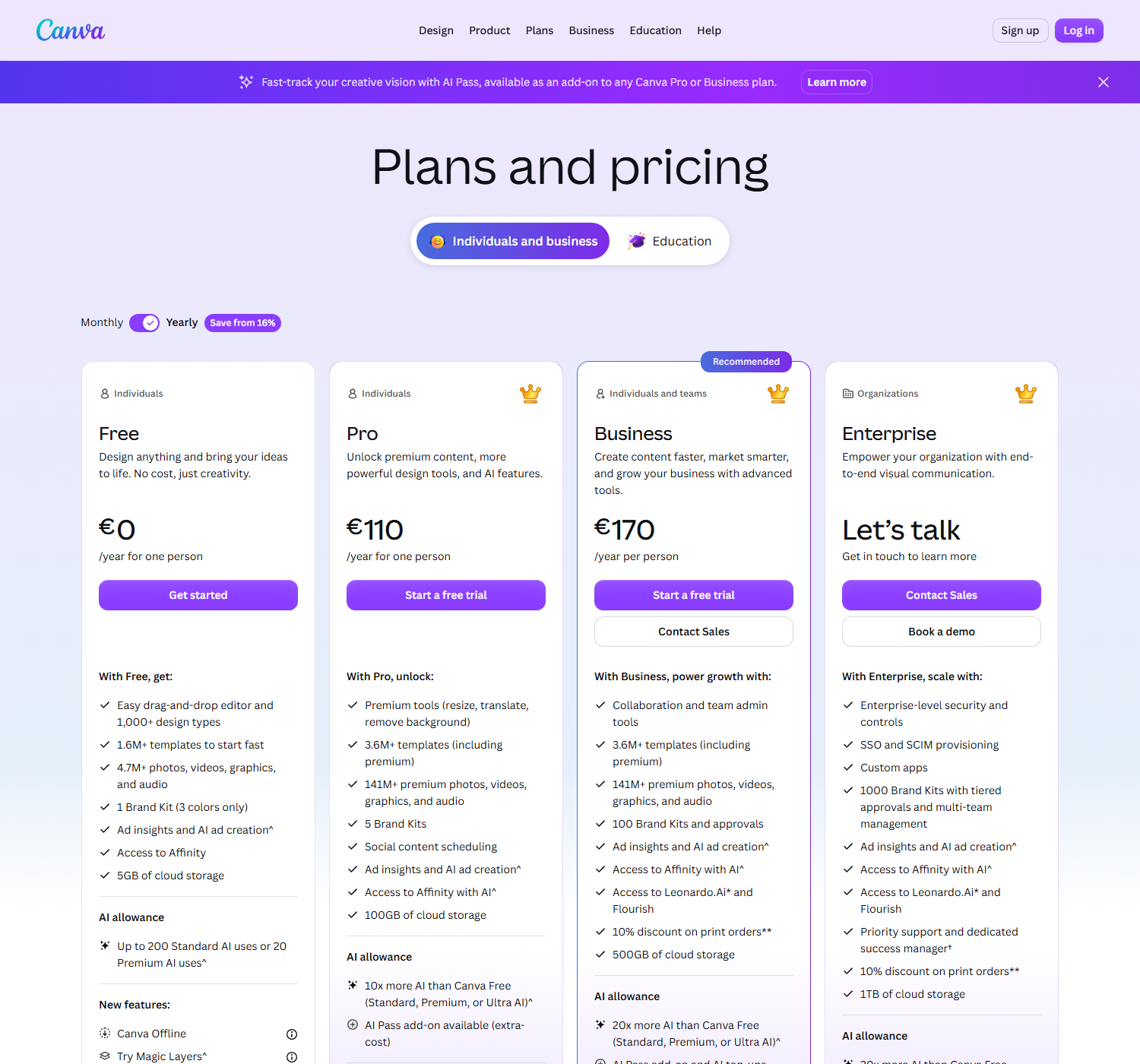
| Plan | Price (yearly) | Who it is for |
|---|---|---|
| Free | €0 | One person |
| Pro | €110 / year for one person | One person |
| Business | €170 / year per person | Individuals and teams |
| Enterprise | ”Let’s talk” | Organisations |
One honest caveat about that table. Canva prices by region based on where you connect from, and our check ran from an EU connection, so the page served euros. I am not going to convert that into a dollar figure and present it as Canva’s US price, because that would be a guess, and guessing is precisely how page one ended up with three contradictory numbers for one subscription. Open canva.com/pricing and you will see your own currency. What holds steady across regions is the structure: four tiers, Pro is single-seat, Business bills per person, and the yearly option saves from 16%.
What Canva Pro costs per month
Canva shows yearly pricing by default and puts a “Save from 16%” badge on it. That badge is the only monthly figure the page will give you without a toggle, so here is the arithmetic, marked as derived rather than measured:
- Measured (screenshot above): Pro = €110 per year, and yearly saves from 16% against monthly.
- Derived: €110 ÷ 0.84 ÷ 12 ≈ €10.90 per month, so paying monthly costs roughly €131 a year, about €21 more.
Treat €10.90 as a floor, not a quote. “From 16%” means the discount can be larger, which would push the true monthly price higher. I am flagging this as derived because the monthly toggle did not render consistently across our checks, and I would rather show you the formula than publish a fourth contradictory number.
Two costs the sticker price hides:
- AI is metered. Free gets “up to 200 Standard AI uses or 20 Premium AI uses.” Pro advertises “10x more AI than Canva Free,” Business 20x. Canva’s footnote says the allowance is shared across Standard, Premium and Ultra tools and that higher tiers consume more of it, so 10x does not translate cleanly into 2,000 uses.
- AI Pass is an extra subscription. It sells on top of Pro or Business. Canva does not show its price on the plans page, so if your workflow leans on AI generation, budget for an unknown on top.
What changed in 2026: Teams is gone
Three shifts explain why older guides read strangely now.
Teams became Business. Canva describes Business as being for “individuals and teams” and prices it per person. Any guide telling you Teams needs a three-seat minimum is describing something that no longer exists.
AI moved to an allowance. Every tier now advertises an AI budget instead of unlimited use.
There is a paid AI add-on. “AI Pass” sells on top of Pro or Business at extra cost.
Read off the live comparison table:
| Free | Pro | Business | Enterprise | |
|---|---|---|---|---|
| Templates | 1.6M+ | 3.6M+ | 3.6M+ | 3.6M+ |
| Premium photos, video, audio | 4.7M+ | 141M+ | 141M+ | 141M+ |
| Brand Kits | 1 (3 colours) | 5 | 100 | 1000 |
| Cloud storage | 5GB | 100GB | 500GB | 1TB |
| Leonardo.Ai + Flourish | no | no | yes | yes |
| Print order discount | no | no | 10% | 10% |
| SSO and SCIM | no | no | no | yes |
For one person selling designs, the meaningful jump is Free to Pro: premium assets, background remover, and 100GB of storage rather than 5GB.
Selling limits: what you can actually sell
This is the part worth your attention. Canva’s Content Licence Agreement decides whether your shop survives a takedown, and almost nobody writing about Canva pricing reads it. I pulled these clauses on 29 July 2026. Canva revises this document without announcement and does not show a version number on the page, so check the date when you read it.
The One Design Use License
Canva licenses Pro Content for use “in a single Canva Design.” The agreement names this the “Pro Content License or One Design Use License,” then states plainly that “You may not copy, download or distribute the Pro Content as a standalone item.” Read that twice if you sell digital products, because it means one premium element buys you one design. You cannot license a single Pro graphic and spread it across a forty-product bundle, you cannot sell the element by itself, and you cannot pass the underlying rights to a customer. A shop built on Canva assets can breach this without ever meeting the clause, because nothing in the editor mentions it while you are dragging the element onto the canvas.
You cannot resell the content
Section 9 lists prohibited uses for free and Pro content alike. You may not:
sub-license, re-sell, rent, lend, assign, gift or otherwise transfer or distribute the Content or the rights granted under this Content License Agreement
It also bars using Canva content as part of a trademark, so a Canva element cannot become your logo.
The 480,000 pixel ceiling
Section 5A restricts Pro Content in online publications:
The use of Pro Content in online or electronic publications, including web pages, blogs e-books and videos, is limited to a maximum of 480,000 total pixels
480,000 pixels works out to roughly 800 by 600. If you sell ebooks, printables or digital downloads built on Pro stock, that ceiling applies. The clause does not spell out whether it counts per image or per publication, and I am not going to pretend to know which. Either reading is tight enough to matter, because the limit is invisible inside the editor and Canva will happily export at whatever resolution you ask for.
Free content cannot go into templates you sell
If your plan was to use only free elements and sell Canva templates, the agreement closes that door by name. You may not:
Use the Free Content in design template applications intended for resale, whether online or not, including, without limitation, website templates, Flash templates, business card templates, electronic greeting card templates, and brochure design templates
That is a direct hit on one of the most widely recommended Etsy side hustles online.
Branded and Disney content is off limits
Branded Content is “personal use only,” and Canva spells out that you may not “Use Branded Content to create merchandise for sale, distribution, or promotional purposes.” The Disney templates and elements are personal or educational use only, print merchandise is restricted to US Pro, Education and Nonprofit accounts, and those prints “may not be used for any commercial purpose.”
Physical prints: resale allowed, no quantity cap
This is the permission the prohibitions bury, and it is the most useful line in the licence. Permitted uses include “prints, posters (i.e. hardcopies) and other reproductions for personal or promotional purposes, resale, license or other distribution,” along with printed materials, product packaging, greeting cards and postcards “for promotion and/or resale, without any reproduction quantity limit.” So printing and selling physical posters from a design you assembled in Canva is allowed, with no cap on the print run. Selling the digital file, or the element on its own, is not. The line Canva draws sits between a finished physical product and the raw content you licensed.
One more trap: on a Canva Education account, Pro Content is limited to “educational, non-commercial purposes,” and Canva instructs you to open a separate account for commercial work.
Where print-on-demand sellers get burned
Posters and wall art: permitted, uncapped. The safest Canva-to-money path in the licence, since physical reproductions for resale are named explicitly. My AI poster workflow covers production.
T-shirts on Etsy or TeePublic: permitted, with one trap. Physical merchandise from a design you composed is allowed, but the moment Branded Content carries the shirt you are exposed. Generic elements composed into original artwork is the safer route, as in my Etsy t-shirt guide.
Digital templates and printables: prohibited or heavily capped. Template resale using free content is barred outright, Pro content is one-design-only, and the 480,000 pixel ceiling applies.
Stock photo sites: do not. Submitting to Adobe Stock or Shutterstock licenses the work onward, and those are rights you do not hold over Canva’s content. Images you generated yourself are a different matter, which I covered in can you sell AI art.
Two questions the licence does not answer, so I will not pretend it does. First, whether uploading to a third-party fulfilment service like Printify or Printful counts as prohibited “distribution” or as the permitted physical-print path. Second, what happens to products already listed if you cancel Pro. Both matter enormously to this audience and both are genuinely unresolved in the text. If either decides your business model, ask Canva support in writing and keep the reply.
Is Canva Pro worth it if you sell things?
Yes for physical products, no as your only tool for digital ones.
For posters, shirts, mugs and print-on-demand generally, Pro earns back the roughly €110 a year on the premium asset library and background remover alone, and you need very few sales to clear it.
For digital products, treat Canva as a design surface rather than a rights source, and build those products on assets you own outright.
If you are a solo seller, skip Business. You would pay more per person for team admin, Brand Kit volume and Leonardo.Ai access that a one-person shop rarely touches.
What sucks about Canva Pro
The licence is buried and the product never warns you. Nothing in the editor says the element you just dragged in is limited to one design, or that Branded Content cannot go on merchandise.
AI allowances made the pricing fuzzy. “10x more AI” is not a number you can plan around, and the AI Pass upsell sits right next to it without a price.
Regional pricing makes every guide wrong somewhere. Including the table above.
What I actually do
I stay on Free and switch Pro on for one month during a heavy production run. I treat Canva as a layout tool rather than an asset library, and my images come from my own AI generation runs, which keeps the One Design Use License away from the assets themselves. Templates, fonts and stock elements can still ride along in a file that feels self-made, so this only works if you are disciplined about what you drag in.
Then the metadata problem shows up. A poster or shirt nobody can find does not sell, and hand-writing titles, tags and keywords across a few hundred uploads is where the hours vanish. That is the job I built AutoKeyWorder (ad, own product) to remove: it reads each image and fills the title, description and tags on Etsy, TeePublic, Displate, Zedge, Adobe Stock and Shutterstock.
The bottom line
Canva Pro is one seat at €110 a year, or roughly €10.90 a month paid monthly (derived). Business replaced Teams and bills per person. Check the figure in your own currency, because it moves by region and any article quoting one global number is guessing.
The price was never the risk. The One Design Use License, the ban on reselling elements, the 480,000 pixel ceiling and the free-content template prohibition decide whether your shop still exists next year.
Physical prints are broadly safe and uncapped. Digital resale is where Canva says no, repeatedly, in writing. Read the licence before you build a catalogue on top of it.
Pricing and licence terms verified against canva.com on 29 July 2026. Canva changes both, so check the live pages before relying on this.