Disclosure
This guide contains affiliate links (marked ad) and promotes tools we built (marked (ad, own product)). We earn a commission on purchases through affiliate links, at no extra cost to you. AutoKeyWorder is our own product. Freepik and Kie.ai are third-party products we promote as affiliates.
This is Module 1 of the AI Income Blueprint. Start there if you haven’t picked your stream yet.
How selling stock photos online works
You upload images to stock platforms. They sell licenses to businesses. You earn per download. That’s the core of how to sell stock photos online.
Adobe Stock pays 33% of the net license price on photos, vectors and illustrations (Adobe’s page, checked October 2026). On a $29.99 plan with 10 photo licenses that is $0.99 per photo, and on its large subscription plan Adobe sets a floor of $0.33 per download. Freepik (ad) pays per download out of subscriber revenue: a 50% share, weighted by download type. Rates per download are lower, volume is higher.
The business model compounds. Upload 500 images once, and they keep earning every month without additional work. Your portfolio is the asset.
Real Earnings: January - March 2026 (First 3 Months)
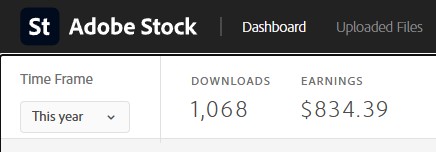
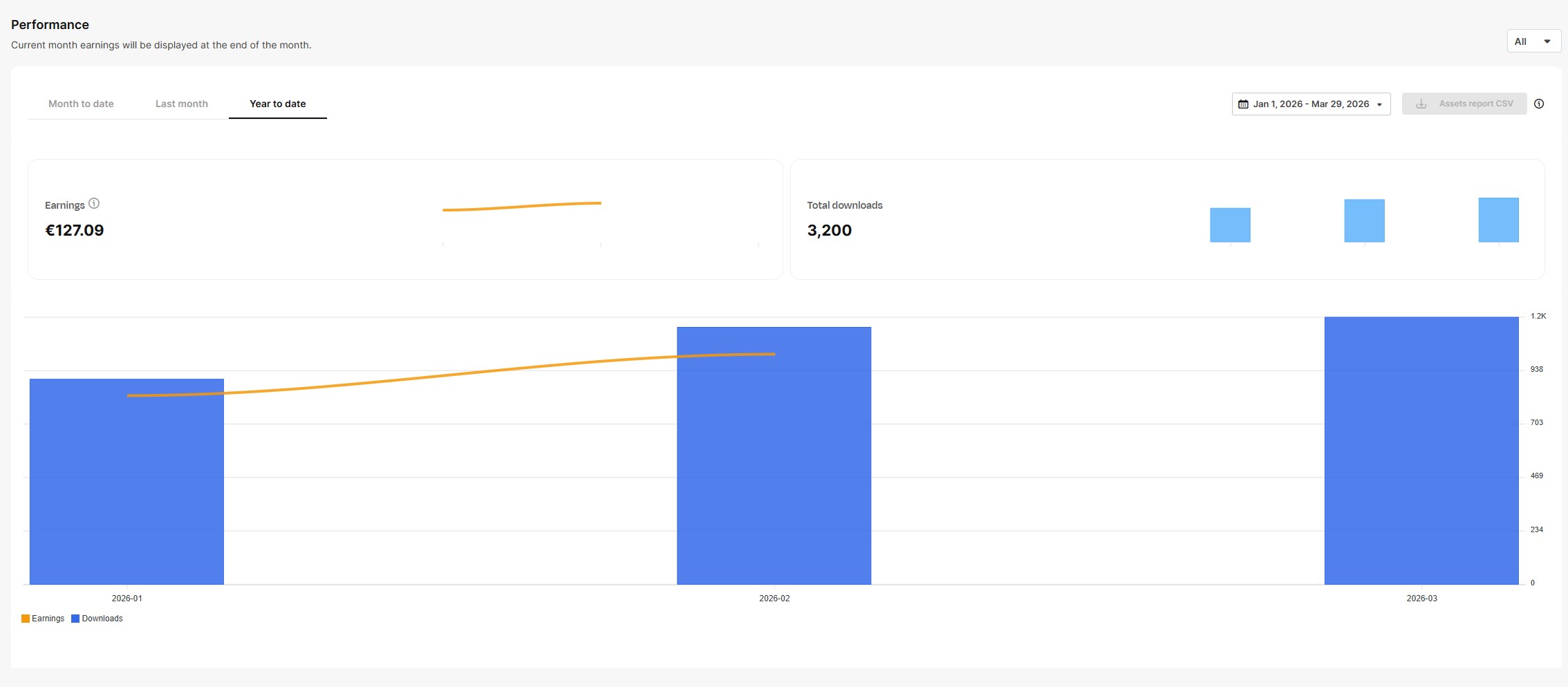
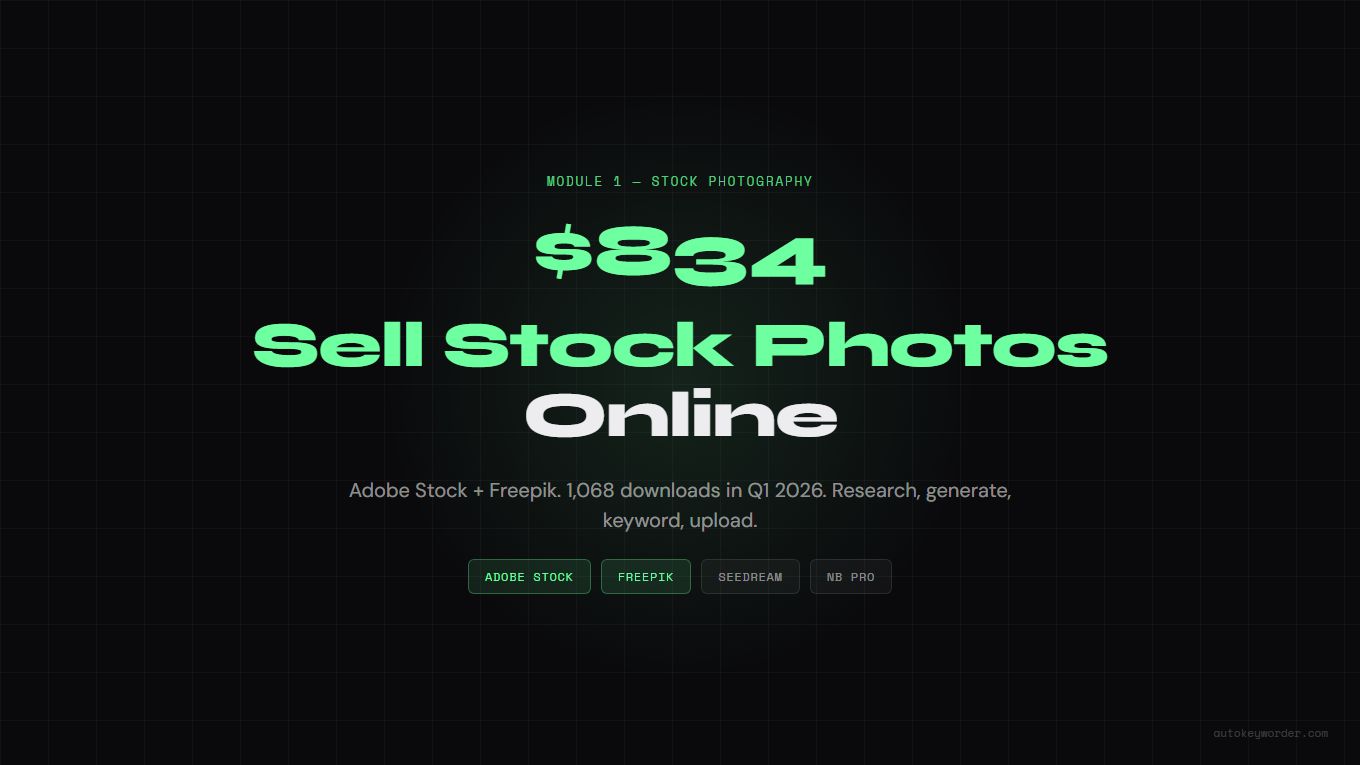
Adobe Stock: $834 from 1,068 downloads. Freepik: €127 from 3,200 downloads. Both from the same portfolio, cross-posted.
What is AI stock photography? AI stock photography uses text-to-image generators to create professional photos for licensing on platforms like Adobe Stock and Freepik. Contributors generate images, add keyword metadata, and earn royalties each time a buyer licenses an image. No camera or studio required.
Table of Contents
- Step 1: Research What Sells
- Step 2: Pick the Right AI Model
- Step 3: Write Prompts That Produce Stock-Quality Images
- Step 4: Generate Your First Batch
- Step 5: Keyword and Metadata
- Step 6: Upload and Go Live
- Platform Comparison
- Common Mistakes
Step 1: Research What Sells
Most beginners generate what looks cool and hope someone buys it. That’s backwards. Stock photography is a search engine. Buyers type a keyword, browse results, and license the best fit. If nobody searches for your topic, nobody finds your image.
Research first. Generate second.
Where to Find Profitable Niches
| Source | What You Learn | How to Access (Free) |
|---|---|---|
| Google Trends | What people search for right now, rising queries, seasonal patterns | trends.google.com - enter keywords, check “Rising” tab |
| Freepik Contributor Trends | What buyers actively search for on Freepik | contributor.freepik.com/search-trends (free contributor account) |
| Adobe Stock Search | Supply level per keyword, gap analysis | stock.adobe.com - search a keyword, compare “Most Relevant” vs “Newest” |
| Unsplash Trends | Editorial demand signals, growth percentage per topic | unsplash.com/trends |
| Google News | Breaking topics that need stock images now | news.google.com - if it’s in the news, buyers need images for it |
| Real conversations about what industries need visuals | r/marketing, r/graphic_design, r/web_design, r/Entrepreneur |
Partner links from this table: Freepik Contributor Trends (ad).
The research method
Cross-reference two or three sources. A topic trending on Google Trends AND appearing in news headlines AND underserved on Adobe Stock is a high-confidence opportunity.
How to spot the gap:
- Search your topic on Adobe Stock
- Look at the top 30 results
- Ask: Are all models the same ethnicity? Is every shot horizontal? Is the color grading stuck in 2018? Is there copy space for text overlay?
- If the answer to any of these is yes, that’s your gap
A South Asian family cooking in a modern kitchen has far less competition than a blonde woman smiling in a white kitchen. A vertical business shot with copy space beats another centered horizontal headshot. The gap is where the money is.
Signal Weighting
Not all research sources carry equal weight.
| Source | Weight | Why |
|---|---|---|
| Google News headlines | Highest | Published articles = buyers need images right now |
| Google Trends “Rising” | High | Search demand before supply catches up |
| Freepik Contributor Trends | High | Direct buyer demand from a stock platform |
| Adobe Stock search results | Medium | Shows supply level, not demand |
| Unsplash Trends | Low-Medium | More editorial than commercial |
The golden rule: If two or more independent sources agree on the same topic, your confidence is high.
Seasonal Calendar
Plan 6-8 weeks ahead. Stock images for Christmas sell best if uploaded in October. Tax season images peak January through April. Back-to-school is July through September.
| Season | Upload By | Topics |
|---|---|---|
| Tax season | November | Finance, accounting, small business, paperwork |
| Valentine’s Day | December | Couples, romance, flowers, restaurants |
| Spring/wellness | January | Fitness, outdoor, gardening, fresh food |
| Back-to-school | June | Education, supplies, classrooms, families |
| Halloween | August | Costumes, decorations, fall themes |
| Holiday season | September | Christmas, gifts, winter, family gatherings |
Twelve minutes for 50 images is the claim, so here is the mechanism behind it. AutoKeyWorder (ad, own product) is a Chrome extension that reads each image with AI vision and fills titles, keywords and categories directly inside the Adobe Stock upload form, with no CSV export and no re-import. AutoKeyWorder runs at roughly 5 seconds per image and covers Adobe Stock, Freepik, Shutterstock, Etsy, Displate, TeePublic and Zedge. Install is free with 50 credits included, one credit per image, no credit card. Try AutoKeyWorder on your next batch
Step 2: Pick the Right AI Model
Different models excel at different subjects. Using the wrong model for the job wastes your time and produces weaker results.
The decision rule
Does the image have a person in it?
That’s it. Two models cover most stock subjects.
| Model | Best For | Cost | Why |
|---|---|---|---|
| Seedream 4.5 | Objects, food, landscapes, interiors, technology | ~$0.032/image | Clean rendering of non-human subjects. No face/hand artifacts. |
| Nano Banana Pro | People, lifestyle, business, portraits | ~$0.09/image | Handles skin texture, facial expressions, hands, and body proportions. |
When to Use Seedream 4.5
Any scene without a visible person. Food photography, product shots, workspace setups, nature, architecture, technology close-ups. Seedream produces clean, photorealistic output at a lower cost.
When to Use Nano Banana Pro
Any scene with a human subject. Business meetings, lifestyle moments, fitness, healthcare, family scenes. NB Pro handles the details that trip up other models: skin texture, realistic hands, natural poses, facial micro-expressions.
People shots require more detailed prompts. The Prompt Engineering module covers the basics, or you can use the NB2 Prompt Generator (ad, own product) to generate production-ready prompts from a simple description.
Step 3: Write Prompts That Produce Stock-Quality Images
A good prompt is the difference between an image that earns and one that sits unnoticed. Stock photos need to feel real, serve a commercial purpose, and avoid common AI artifacts.
Universal Rules (Apply to Every Prompt)
| Rule | Why |
|---|---|
| Minimum 5 concrete nouns | Highest quality correlation across all models |
| No beauty words (“beautiful”, “stunning”, “gorgeous”) | Triggers plastic, over-processed look |
| No hex color codes (#FF0000) | Renders as visible text artifacts in the image |
| No render engine names (“Octane”, “Unreal Engine”) | Zero measurable effect on output |
| No resolution keywords (“8K”, “ultra HD”) | Zero measurable effect on output |
| Always include anti-text constraint | Without it, ~40% of images contain random gibberish text |
| One scene per prompt | Combined scenes produce incoherent results |
Seedream Prompt Formula (No People)
[Editorial/Professional] photograph of [subject with 5+ concrete nouns].
[Setting with 2-3 surface materials]. [One lighting sentence with direction + color temp].
[Dynamic moment, e.g. "caught mid-", "steam rising", "just sliced"].
[Camera perspective, e.g. bird's-eye, macro, 45-degree overhead].
No 3D render, no illustration, no CGI, no watermark, no text.
Target length: 80-150 words. Natural prose, not tag lists.
Example Prompts (Seedream 4.5)
Food:
Editorial photograph of a cast-iron skillet filled with sizzling shakshuka, three eggs nestled in chunky roasted tomato sauce, scattered fresh cilantro leaves, crumbled feta cheese, and a torn piece of sourdough bread resting on the skillet rim. Weathered oak cutting board underneath, linen napkin bunched to the left. Single overhead warm directional light casting deep shadows into the skillet basin, steam caught mid-rise from the bubbling sauce. Extreme close-up, 45-degree overhead angle. No 3D render, no illustration, no CGI, no watermark, no text.
Technology:
Professional photograph of a disassembled mechanical keyboard mid-repair on a matte black desk. Cherry MX switches scattered across an anti-static mat, brass tweezers gripping a single switch, keycaps arranged in a color gradient from white to charcoal. Warm desk lamp from upper left throwing long shadows across PCB traces. Macro perspective, shallow focus on the tweezers. No 3D render, no illustration, no watermark, no text.
Workspace:
Editorial photograph of an architect’s drafting table covered in blueprints, a wooden scale ruler, mechanical pencils in a leather roll, and a half-empty ceramic coffee mug with a dried ring stain. Morning light from a floor-to-ceiling window casting long parallel shadows across the paper. Wide-angle shot at desk height, shallow depth of field blurring the window behind. No 3D render, no illustration, no CGI, no watermark, no text.
Wellness:
Professional photograph of a jade gua sha stone and rosemary oil bottle on a folded linen towel, white marble bathroom counter. A single eucalyptus sprig and two rolled hand towels beside them. Soft diffused daylight from the right, warm white color temperature. Close-up at counter level, 30-degree angle. No 3D render, no illustration, no watermark, no text.
Nature:
Editorial photograph of a single monarch butterfly perched on a wild thistle flower, wings fully spread. Morning dew droplets visible on the wing scales. Background is a soft bokeh field of purple wildflowers. Golden hour backlighting catching the translucent wing edges. Macro lens perspective, eye-level with the flower. No CGI, no illustration, no watermark, no text.
Nano Banana Pro Prompts (People)
People shots need structured, detailed prompts to avoid the “AI look.” The full framework covers appearance, wardrobe, pose, environment, camera settings, and lighting.
A simplified example:
Professional lifestyle photograph of a woman in her early 30s reviewing architectural plans spread across a reclaimed wood conference table. She wears a fitted olive blazer over a white crew-neck tee, sleeves pushed to mid-forearm. Caught mid-gesture, right hand holding a mechanical pencil pointing at a floor plan detail. Modern co-working space with exposed brick wall and pendant Edison bulbs. Canon EOS R5 with 50mm f/1.4 lens, medium shot from across the table. Natural window light from the left at 4500K, warm fill from Edison bulbs above. No airbrushing, no plastic skin, no 3D render, no watermark, no text.
Writing detailed people prompts takes practice. The Prompt Engineering module covers the essentials. For production-quality prompts without the learning curve, the NB2 Prompt Generator (ad, own product) creates the full structured prompt from a short description like the one above.
What gets rejected
Stock platforms reject images with these issues:
- Visible text artifacts (random letters, numbers, symbols)
- Extra fingers, fused hands, deformed anatomy
- Brand logos or recognizable product designs
- Celebrity likenesses
- Excessive AI smoothing (“plastic skin”)
- Prompts, titles or keywords that name artists, real people, fictional characters or brands (Adobe can remove the content or close the account)
- Several versions of the same prompt (Adobe treats this as spam)
- Resolution below 4MP
The anti-text constraint and the right model selection prevent most of these. Always zoom to 100% and check hands, faces, and any area with text before uploading.
Step 4: Generate Your First Batch
The workflow for your first 20 images:
- Pick a niche from your research (Step 1). Start narrow: “remote work home office” not just “business.”
- Write 20 prompts using the formulas above. Vary the scenario, demographic, angle, and lighting within your niche.
- Generate on Kie.ai (ad). Use Seedream 4.5 for scenes without people, Nano Banana Pro for scenes with people.
- Review at 100% zoom. Check hands, faces, text artifacts, and overall composition.
- Keep the top 10-15. Reject anything with visible artifacts, poor composition, or that doesn’t serve a commercial purpose.
Cost for 20 images: $0.64 (Seedream) to $1.80 (NB Pro). Under $2 for your first batch.
Quality beats quantity. Ten strong images with good keywords outperform 100 mediocre uploads every time.
Step 5: Keyword and Metadata
This is the step that separates images that earn from images that sit at zero downloads.
Stock platforms are search engines. Buyers type keywords, browse results, license what fits. If your keywords don’t match what buyers search for, your image is invisible.
Why keywords matter more than image quality
A mediocre image with perfect keywords gets found and downloaded. A perfect image with bad keywords gets buried on page 50. The math is simple: discoverability drives revenue.
Manual Keywording (Free, Slow)
For each image:
- Write a short, descriptive title (Adobe suggests under 70 characters)
- Add 20-35 relevant keywords (Adobe allows up to 49, Freepik 5-50)
- Select the right category
- Flag as AI-generated (required on Adobe Stock and Freepik)
At 3 minutes per image, a batch of 50 takes over 2 hours. By image 30, you’re recycling the same keywords and missing niche-specific terms that buyers search for.
Automated Keywording with AutoKeyWorder (Fast)
AutoKeyWorder (ad, own product) analyzes your image and generates 25-50 relevant keywords in seconds. It handles titles, descriptions, and platform-specific tag formats.
The workflow:
- Paste your image into AutoKeyWorder
- Review the generated keywords (add or remove as needed)
- Copy to your platform’s upload form
What takes 3 minutes manually takes about 15 seconds. For a batch of 50 images, that’s 12 minutes instead of 2.5 hours.
Platform-Specific Metadata Requirements
| Platform | Title | Keywords | AI Flag |
|---|---|---|---|
| Adobe Stock | Short, ideally under 70 chars | Up to 49; the first 10 weigh most in search | Tick “Created using generative AI tools” |
| Freepik | 35-100 chars recommended, in English | 5-50 (20 relevant ones are enough) | Use the AI button or the _ai_generated tag in the CSV |
| Shutterstock | n/a | n/a | Does not accept contributor AI images |
Partner links from this table: Freepik (ad).
Keyword strategy tips
- Front-load your most important keywords. Some platforms weight the first 5-10 keywords more heavily.
- Include both broad and specific terms. “business” AND “woman reviewing financial report in glass office.”
- Add format keywords. “horizontal”, “copy space”, “overhead view”, “close-up” help buyers find specific compositions.
- Think like a buyer. A designer searching for a hero image for a healthcare website types “doctor patient consultation modern clinic.” Match their search.
Step 6: Upload and Go Live
Where to Upload First
Start with two platforms. Master the workflow before expanding.
Adobe Stock (Priority #1)
- Highest revenue per download
- Professional buyer base with budgets
- Direct integration with Adobe Creative Cloud
- Sign up as a contributor
Freepik (Priority #2) (ad)
The contributor site is now called Magnific Contributor. Existing accounts, contracts and payouts carry over, and the old link redirects there.
- High download volume (millions of subscribers)
- Strong European market
- Accepts AI content if it is tagged as AI and passes the quality rules
- New contributors must first send 150-200 assets for an entrance review
- Good for building portfolio size and visibility early
Upload Checklist
- Image is minimum 4MP (most AI generators output 4K, which is fine)
- JPEG format, sRGB profile, highest quality setting
- No visible text artifacts, hand deformities, or brand elements at 100% zoom
- Title is descriptive and keyword-rich
- 20-35 keywords added (use AutoKeyWorder (ad, own product))
- Category selected
- AI-generated flag checked (Adobe: “Created using generative AI tools”, plus “People and Property are fictional” if a person appears)
- Image serves a clear commercial purpose (not just “looks cool”)
After Upload
Adobe Stock gives no fixed review time. It says the wait depends on the size of the review queue and the content type. Magnific tells new contributors to allow at least 25 working days for the first review. Once approved, your images start appearing in search results.
Don’t check stats daily for the first two weeks. Focus on uploading your next batch. The first 100 images are the hardest. After that, you have data: which topics get views, which get downloads, which earn the most per download. Use that data to guide your next batch.
Platform Comparison
| Factor | Adobe Stock | Freepik | Shutterstock |
|---|---|---|---|
| Royalty Rate | 33% of net price | 50% share of subscriber net revenue, weighted | 15-40% (6 yearly levels) |
| Revenue Per DL | $0.99 on a $29.99 / 10-photo plan; floor $0.33 on the large plan | €0.04 average in my Q1 2026 numbers (€127 / 3,200) | $0.10 minimum |
| Buyer Quality | Agencies, enterprise | Designers, students, SMBs | Mixed |
| Volume | Medium-High | Very High | High |
| AI Acceptance | Yes (with flag) | Yes (with AI tag) | No, contributor AI is not accepted |
| Best For | Revenue per image | Volume and visibility | Catalog breadth |
Partner links from this table: Freepik (ad).
Start with Adobe Stock + Freepik. Adobe for revenue quality, Freepik for volume. Shutterstock is closed to AI images, so it is not a third channel for this workflow.
Handling Rejections
Adobe Stock and Freepik reject images. It’s not personal, their review teams apply consistent rules. Knowing the reason codes saves you from resubmitting the same problem repeatedly.
The most common rejection reasons
Intellectual property issues. Any recognizable brand logo, product design, or architectural trademark gets rejected. This includes partially visible logos on clothing, car brand emblems, and recognizable building facades. Fix: regenerate with the branded element removed from the prompt, or pick a prompt that keeps the scene generic.
Model or property releases. If your image contains a recognizable person (even AI-generated) used in a commercial context, advertising, endorsement, product promotion, platforms may ask for a model release. For editorial use this doesn’t apply, but most buyers want commercial licensing. Fix: generate clearly fictional people without individually recognizable features. Seedream and NB Pro both do this well with natural prompts. On Adobe Stock, tick “People and Property are fictional” when a generated person appears. A model release is only needed if the image is based on a real person.
Image quality: artifacts. Text artifacts, distorted hands, fused fingers, floating limbs, and background inconsistencies. Fix: zoom to 100% before submitting. Check hands, text areas, and edges. Reject images with any visible artifact. It’s faster to generate a replacement than to fight a rejection.
Image quality: resolution. Adobe Stock requires a minimum of 4MP. Most AI generators output 4K or higher, so this is rarely an issue. If you’re downscaling or compressing aggressively, check the output dimensions before upload.
Over-processing. Heavy Lightroom-style filters, excessive sharpening, or high-saturation color grading. Adobe Stock’s aesthetic is clean and commercial, not Instagram-filtered. Fix: don’t post-process AI outputs. The generators produce commercially neutral results that platforms accept as-is.
Duplicate or series content. Submitting 10 nearly identical images from the same prompt counts as duplicates. Fix: genuinely vary your prompts, different demographics, angles, lighting, and settings, not just different seeds on the same prompt.
What to Do When Rejected
- Read the rejection reason carefully. Most platforms use consistent category codes.
- Identify which of the above categories applies.
- Fix the underlying issue, don’t resubmit the same image hoping for a different outcome.
- If the rejection reason is unclear, generate a fresh image for that slot rather than appealing. The time cost of one new generation is lower than the time cost of an appeal process.
A 10-20% rejection rate is normal. Rates above 30% indicate a systematic issue: wrong model for your content type, prompt formula producing artifacts, or a niche that’s triggering IP flags.
Why Shutterstock Is Not Platform #3
Shutterstock does not accept AI-generated content from contributors. Its help center said so on July 16, 2025, and gave two reasons: contributors cannot prove they own the IP of AI output, and Shutterstock cannot verify which artists’ work a model learned from. Shutterstock runs its own generator with OpenAI. It just does not take yours.
So every image in this workflow stays on Adobe Stock and Freepik. If you also shoot real photos, Shutterstock is open to those. As of October 2026, it pays by yearly level: 15% up to 100 licenses, then 20%, 25%, 30%, 35% and 40% above 25,000 licenses. Levels reset on January 1. Some downloads pay a $0.10 minimum at any level.
Month 2: What Changes
The first month is about building the portfolio. Month 2 is about compounding what works.
By the end of Month 1 you have 100+ images and enough download data to identify 2-3 winning niches. Month 2 strategy is simple: generate nothing new except in those winning niches.
What to do in Month 2:
- Generate 4 new batches (20-25 images each) in your top 2 niches only
- Check that every Week 1-4 image is live on both Adobe Stock and Freepik
- Build themed collections on Adobe Stock (group 10-15 related images into a collection, it increases visibility in the platform’s browse features)
- Review your lowest-performing 20 images. If they have zero downloads and zero views after 30 days, they may be keyword problems. Re-run them through AutoKeyWorder (ad, own product) and update the keywords
Month 2 earnings target: $30-$80/month across Adobe and Freepik combined.
The compounding effect becomes visible in Month 3-4 when seasonal content you uploaded in Month 1 starts surfacing in relevant seasonal searches.
Common Mistakes
Generating without research. You wouldn’t open a store without checking if people want to buy what you’re selling. Same principle. Research first.
Uploading everything. Be selective. Ten strong images beat fifty mediocre ones. Reject anything with artifacts, poor composition, or no clear commercial use.
Ignoring keywords. This is the #1 reason new contributors fail. An image without good keywords is invisible. Spend as much time on metadata as you do on generation.
Chasing trends too late. If you see a trending topic on Google Trends and it’s already at “peak,” you’re late. Look for “Rising” topics and seasonal needs 6-8 weeks out.
Same demographic in every image. Stock buyers actively seek diversity. Vary age, ethnicity, body type, and setting across your portfolio. The gaps in representation are where competition is thinnest.
Uploading to one platform. Cross-post the same images to Adobe Stock and Freepik. Each platform has different buyers. Same images, two revenue streams.
Frequently asked questions
How much can you earn selling stock photos online? A portfolio of 500 images typically earns $50-$150/month on Adobe Stock. Adobe pays 33% of the net license price, with a $0.33 floor on its large subscription plan. A small share of your images drives most of the earnings. Income grows as your portfolio grows.
Do stock photo platforms accept generated images? Adobe Stock and Freepik accept generated images. Each requires you to label them as AI. Shutterstock does not accept contributor AI images. Check platform policies before uploading, as rules change.
How many keywords should a stock photo have? Adobe Stock allows up to 49 keywords per image and weighs the first 10 most. Freepik accepts 5-50. Front-load your most relevant keywords. Use a mix of broad terms and specific descriptors.
Which stock photo platform pays the most? Adobe Stock pays 33% of the net license price. Freepik pays a 50% share of subscriber revenue, which works out to a lower amount per download but a higher download volume. Most contributors upload to both.
How long until stock photos start earning? Review time depends on the queue, and Magnific asks new contributors to allow at least 25 working days. After approval, first downloads typically arrive within 1-3 weeks if your keywords match buyer searches. Revenue compounds as your portfolio grows month over month.
Your next steps
- Research: Spend 30 minutes with Google Trends and Adobe Stock search. Find 3 underserved niches.
- Generate: Create 20 images on Kie.ai (ad). Seedream for objects, NB Pro for people.
- Keyword: Run them through AutoKeyWorder (ad, own product).
- Upload: Submit to Adobe Stock and Freepik (ad).
- Repeat: Upload a new batch every week. Aim for 100 images in your first month.
← Back to AI Income Blueprint | Next: Posters →
Part of the AI Income Blueprint series. See all modules and the full tools page.