Disclosure
This guide contains affiliate links (marked ad) and promotes tools we built (marked (ad, own product)). We earn a commission on purchases through affiliate links, at no extra cost to you. AutoKeyWorder is our own product. Magnific (formerly Freepik), Kie.ai (including the Topaz upscaler it hosts), eRank, and Placeit are third-party products we promote as affiliates.
The short version
My first-quarter 2026 dashboards show earnings from four separate streams, all built from the same core skill: generating images and putting them where buyers already shop. If you want to learn how to sell photos online and earn passive income from images, this guide is the system.
No fluff, no theory. Each section links to a detailed module with research methods, copy-paste prompts, and the exact tools I use. I run my image generation on Kie.ai (ad).
Pick one stream. Follow the module. Upload your first batch today.
Real Earnings: January - March 2026 (First 3 Months), $1,312 Across 6 Platforms
These are my actual dashboard screenshots from the first 3 months of 2026. The headline total adds the dollar and euro figures as printed, without converting the euros.
| Platform | Q1 2026 Earnings | Volume |
|---|---|---|
| Adobe Stock | $834 | 1,068 downloads |
| Freepik (now Magnific Contributor) | €127 | 3,200 downloads |
| Zedge | $164 | 10,000 unlocks |
| Displate | $82 | 24 posters sold |
| Etsy | €70 | 22 orders |
| Spreadshirt | €35 | 17 sales |
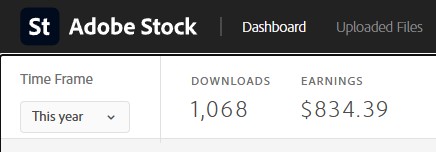
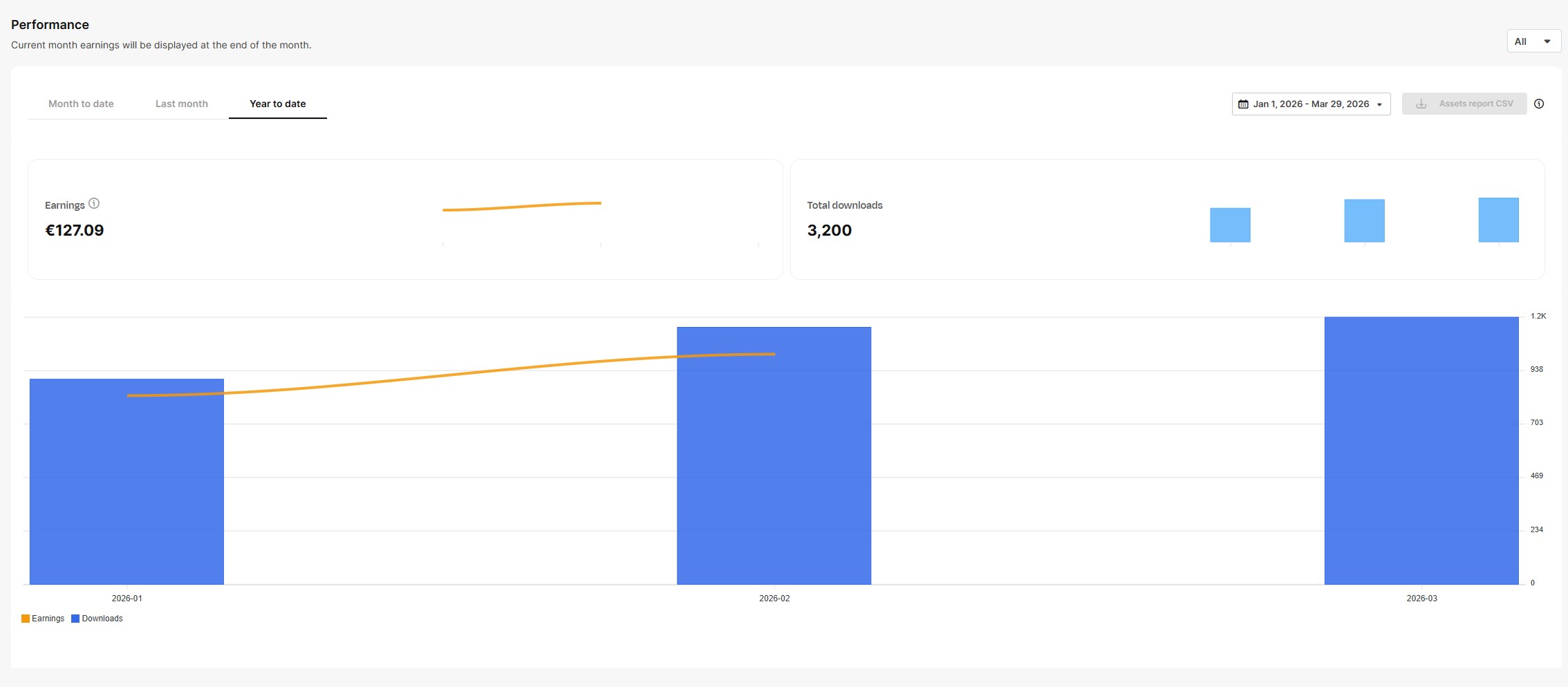
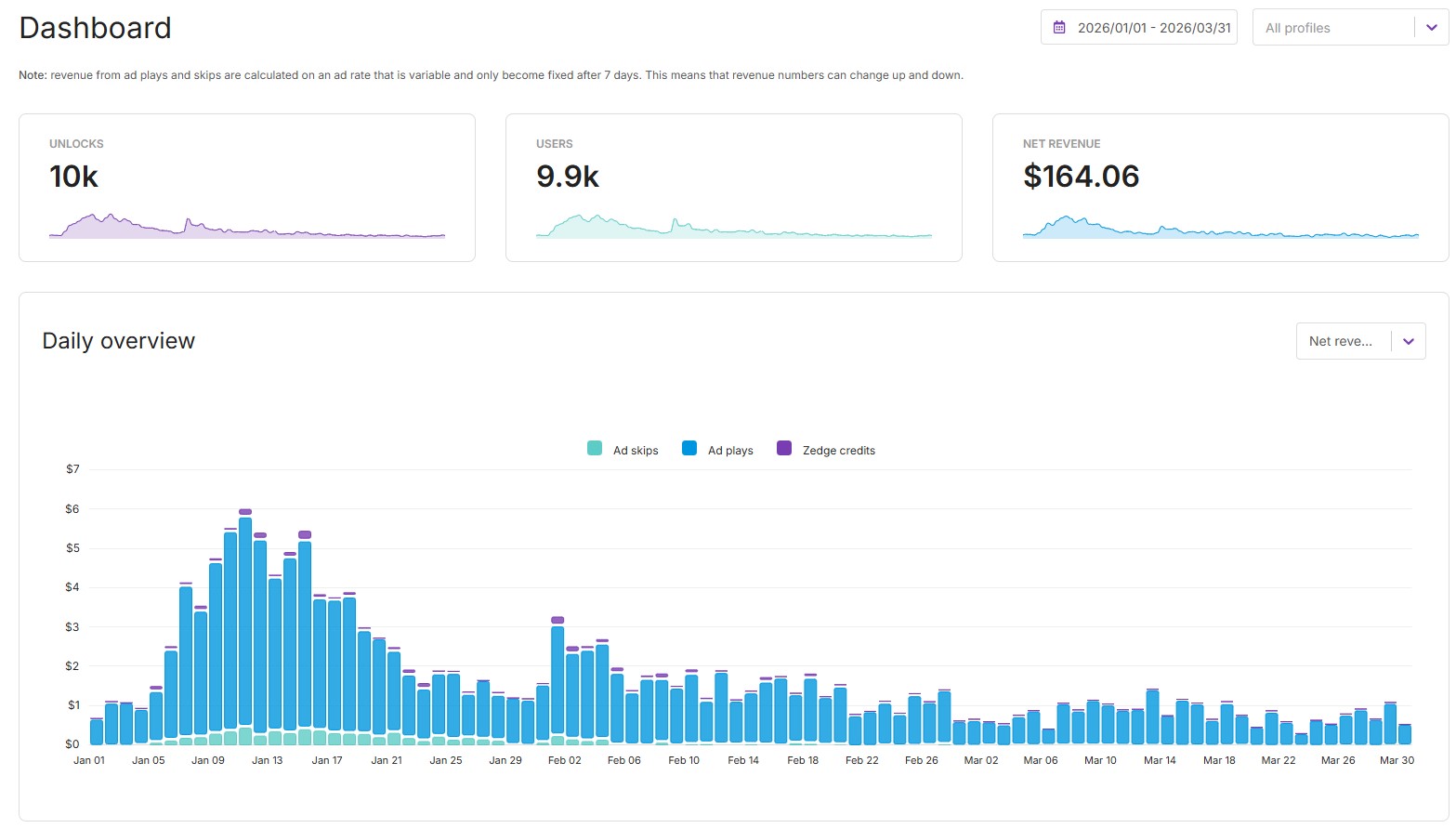
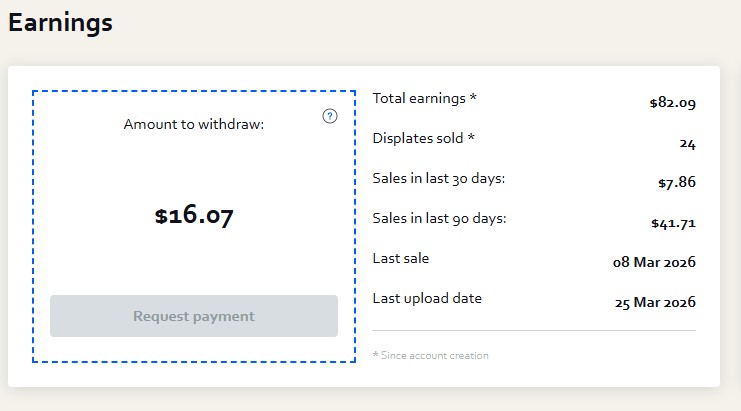
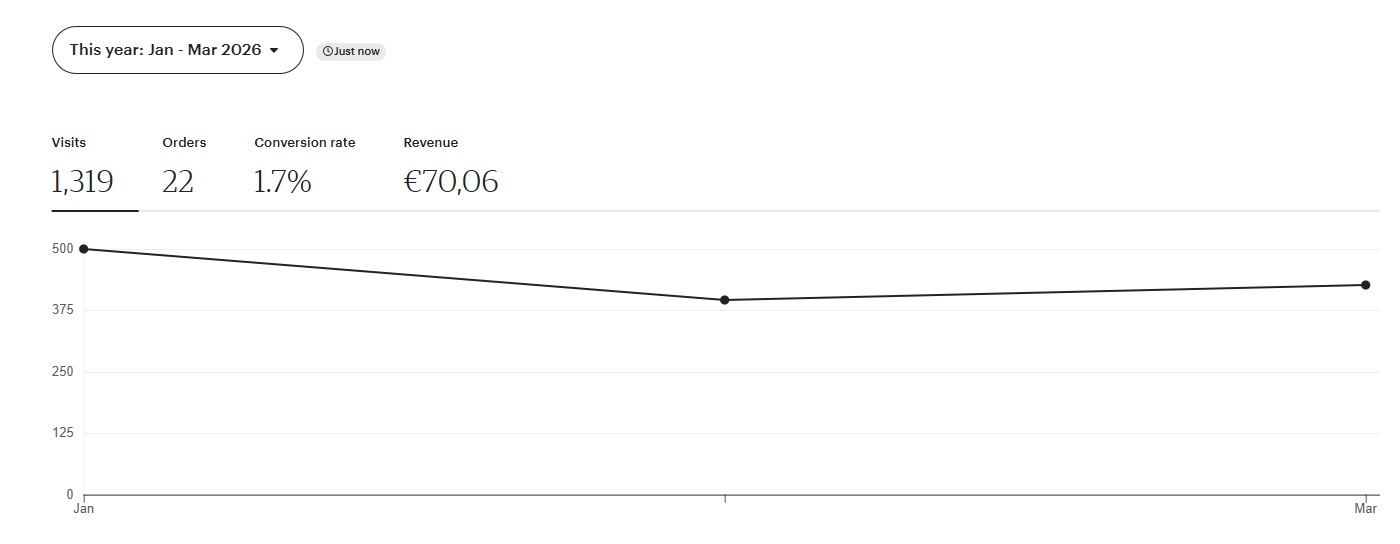
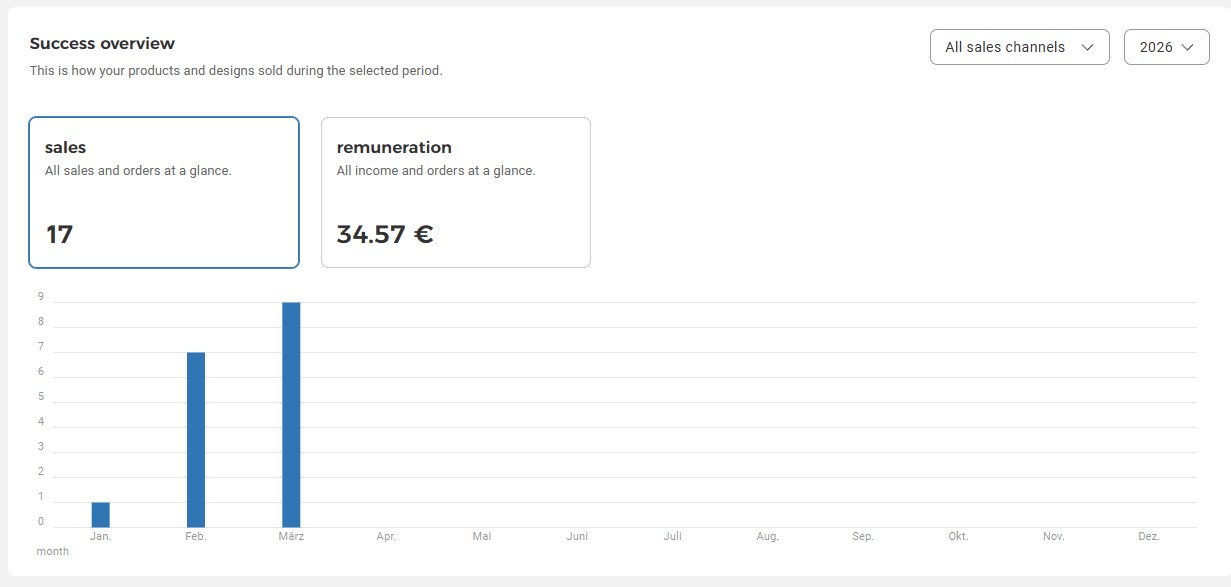
Etsy and Spreadshirt earnings are residual. I haven’t uploaded new products to either platform this year. Those sales come from bundles and designs uploaded in 2025, still earning without any additional work. That’s the compound effect of digital products.
What is selling photos online? Selling photos online means uploading images to stock platforms, print-on-demand sites, or digital marketplaces where buyers license or purchase them. Contributors earn royalties per download, commissions per sale, or direct revenue from digital product sales. No photography studio required.
Step 3 is the one step in this loop you can hand off. AutoKeyWorder (ad, own product) is a Chrome extension that reads each image with AI vision and fills titles, keywords and categories directly inside the upload form, with no CSV export and no re-import. AutoKeyWorder runs at roughly 5 seconds per image and covers Etsy, Adobe Stock, Shutterstock, Freepik, Displate, TeePublic and Zedge. Install is free with 50 credits included, one credit per image, no credit card. Install AutoKeyWorder free
How to Sell Photos Online: 4 Income Streams
Each stream works independently. You don’t need all four. Start with one, add more when you’re ready.
Stream 1: Stock Photography
You generate photos. Platforms like Adobe Stock and Magnific Contributor, formerly Freepik (ad) license them to businesses. You earn per download. Shutterstock does not accept contributor AI images.
Who buys: Designers, marketers, agencies, media companies. What sells: Business scenes, lifestyle, food, technology, wellness. Topics with commercial demand and thin supply. Earning model: Royalties per download. An approved image stays in your portfolio and keeps earning while it sells. My own result: $834 from 1,068 downloads on Adobe Stock and €127 from 3,200 downloads on Freepik in Q1 2026 (table above). I have no data on what a beginner earns.
Read the full Stock Photography module →
Stream 2: Posters and Wall Art
You generate artwork. Platforms like Displate print it on metal and ship it. You earn a commission on every sale.
Who buys: Gamers, interior design enthusiasts, collectors. What sells: Dark fantasy, cyberpunk, Japanese aesthetics, art deco, minimalist geometric. Bold, moody pieces that look good on a wall. Earning model: Commission per sale ($4.50-$14.50 per poster, or 41% of the net price on sales through your own Share and Earn link). My own result: 24 posters sold for $82.09 on Displate in Q1 2026. Displate fixes the prices, so you cannot change them.
Read the full Posters module →
Stream 3: Phone Wallpapers
You generate vertical artwork optimized for phone screens. Distribute through Zedge, Etsy, or Gumroad.
Who buys: Everyone with a phone. Zedge reports 35M+ monthly active users, and the pay per download is small. What sells: Anime, ukiyo-e (Japanese woodblock), retro travel, gradient art, dark AMOLED designs. In my own batches, style variety did better than any single aesthetic. Earning model: Zedge ad-gated or paid downloads (you keep 70% on paid ones), and direct sales of themed packs ($1.99-$4.99 on Etsy/Gumroad in my range). My own result: $164.06 net revenue from 10,000 unlocks on Zedge in Q1 2026, most of it in the first weeks.
Read the full Wallpapers module →
Stream 4: Etsy Digital Products
You generate SVG icons, clipart bundles, t-shirt designs, and sticker sheets. Sell as instant-download digital products on Etsy.
Who buys: Cricut and Silhouette crafters, small business owners, teachers, DIY designers. What sells: Icon bundles (50-100 pieces), themed clipart sets, t-shirt graphics, vintage badges. Earning model: Direct sales. You set the price ($2.99-$7.99 per bundle is my usual range). Etsy fees take roughly 18% of a $4.99 bundle with a US bank account. My own result: €70 from 22 orders on Etsy in Q1 2026, all from bundles uploaded in 2025.
The universal workflow
All four streams follow the same loop. The tools change. The process doesn’t.
RESEARCH → GENERATE → KEYWORD → UPLOAD → SELLStep 1: Research what sells. Every stream has free research sources. Google Trends, platform trending pages, Reddit communities, competitor analysis. You never generate blindly. Each module shows you exactly where to look.
Step 2: Generate images. AI models turn your text prompt into a finished image. Different models for different jobs. People shots need one model, flat vectors need another. The prompt module teaches the formulas.
Step 3: Keyword and optimize. The best image in the world earns nothing if nobody finds it. Keywords, titles, descriptions, and tags determine whether your work gets discovered. This is the step many beginners skip.
Step 4: Upload to platforms. Each platform has specific requirements: resolution, format, metadata fields. The modules walk you through each one.
Step 5: Sell. You uploaded. The platform handles the rest. Buyers find your work through search, license it, and you earn.
The Tools
Every tool in this guide has a free option. Paid tools save time, but you can start with zero investment.
I’ve listed my full stack, with both free alternatives and the paid tools I use, on the dedicated tools page. Affiliate links are clearly marked.
See the full Tools page with free and paid options →
Quick overview:
| Pipeline Step | Free Option | What I Use |
|---|---|---|
| Research | Google Trends, platform trending pages, Reddit | eRank for Etsy research |
| Generate images | Kie.ai free tier | Kie.ai paid plans |
| Upscale (posters/wallpapers) | — | Topaz upscaling on kie.ai |
| Keywords & metadata | Manual tagging (slow) | AutoKeyWorder (ad, own product) |
| Mockups (Etsy) | Canva free tier | Placeit |
| Sell stock photos | Adobe Stock (free to upload) | Magnific Contributor (formerly Freepik) |
| Prompt writing | Write your own (prompt guide) | NB2 Prompt Generator (ad, own product) |
Partner links from this table: eRank (ad), Kie.ai (ad), Topaz upscaling on kie.ai (ad), Placeit (ad), Magnific Contributor, formerly Freepik (ad).
Where to Start
Don’t try all four streams at once. Pick one. Get your first upload live today.
If you want the cheapest place to test: Start with wallpapers. Zedge is free to join and shows impressions and downloads for each item. Upload 20 wallpapers and read the dashboard.
If you want slow and steady income: Start with stock photography. Slower to build, but approved images stay for sale. I have no figure for what a portfolio of a given size earns.
If you want the highest price per sale: Start with Etsy digital products. A single bundle at $4.99 that sells 10 times a week grosses about $200 a month before fees.
If you want creative expression with income: Start with posters. Design art you’re proud of, see it printed on metal, earn commissions.
The blueprint modules
This is the full course. Each module is a standalone guide. Read them in order, or jump to the stream that interests you.
| # | Module | What You’ll Learn |
|---|---|---|
| 1 | Stock Photography | Research profitable niches, generate with Seedream and NB Pro, keyword for Adobe Stock and Magnific Contributor |
| 2 | Posters | Find what sells on Displate, generate wall art with Recraft and NB2, upscale for print |
| 3 | Wallpapers | Scan Wallhaven and Zedge trends, create phone-optimized vertical art, distribute across platforms |
| 4 | Etsy Digital Products | Etsy keyword research, SVG generation with Recraft V4, bundle strategy, listing optimization |
| 5 | Prompt Engineering | Prompt formulas for every stream, model selection, copy-paste templates |
| 6 | 30-Day Action Plan | Week-by-week schedule, daily routine, what to check at each checkpoint |
| 7 | My Tools | Free vs. paid comparison, affiliate links, monthly cost breakdown |
Common Questions
Do I need design experience? No. The prompts do the design work. You need to learn what sells (research) and how to describe it (prompting). Both are taught in the modules.
How much does it cost to start? Close to zero. Kie.ai has a limited free tier, and Adobe Stock, Zedge and Displate are free to join. Etsy charges $0.20 per listing. A free Magnific account is for testing only, because its terms limit free output to personal use. Paid tools speed up the workflow, but they’re optional.
Is AI-generated content allowed on these platforms? It depends on the platform. Adobe Stock and Magnific Contributor accept labelled AI images. Etsy requires you to say so in the listing description. Zedge says AI work must be your own original creation. Displate states no AI ban but rejects near-duplicates and low-effort work. Shutterstock does not accept contributor AI images. I found no AI rule in Redbubble’s content guidelines, so check it before you upload. I read these rules on October 7, 2026, and each module covers the details.
How long until I earn money? I have no typical timeline. Adobe Stock gives no fixed review time, and Magnific asks new contributors to allow at least 25 working days for the first review. Zedge shows impressions and downloads for each item, so it gives you the earliest signal. The 30-day plan lists what to check each week.
Can I really make a living from this? Treat it as a side income until your own numbers say otherwise. I have no data on typical results, so I will not quote a range. My own Q1 2026 table above adds up to 1,312 in mixed dollars and euros over three months, from six platforms.
Ready to start? Pick your first stream:
- Stock Photography → (slow and steady)
- Posters → (best for creative work + income)
- Wallpapers → (cheapest place to test)
- Etsy Digital Products → (highest price per sale)