Disclosure
This guide contains affiliate links (marked ad) and promotes tools we built (marked (ad, own product)). We earn a commission on purchases through affiliate links, at no extra cost to you. AutoKeyWorder is our own product. Kie.ai, eRank, and Placeit are third-party products we promote as affiliates.
This is Module 4 of the AI Income Blueprint. Start there if you haven’t picked your stream yet.
How to Sell Digital Art on Etsy
You create digital files. Buyers purchase and download them instantly. No shipping, no inventory, no fulfillment. Etsy is one of the best platforms to sell digital art because buyers actively search for downloadable design assets.
Etsy charges a $0.20 listing fee per item. A listing runs four months and then renews for another $0.20, or it renews when it sells. Etsy also takes a 6.5% transaction fee on the item price plus any shipping you charge, and a payment processing fee that depends on the country of your bank account. Some countries add a regulatory operating fee on top. With a US bank account and the usual 3% + $0.25 processing fee, you keep roughly $4.00 of a $4.99 bundle. The fixed parts weigh most on cheap items. I read the Etsy fee policy on October 7, 2026. If you haven’t opened a shop yet, my beginner guide on how to sell on Etsy covers the set-up steps and every fee.
The magic of Etsy digital products is that you build it once and sell it forever. Create one bundle of 50 SVG icons. List it once. Sell it a hundred times. Every sale after the first costs you no extra work, only the platform fees.
Real Earnings: January - March 2026 (First 3 Months)
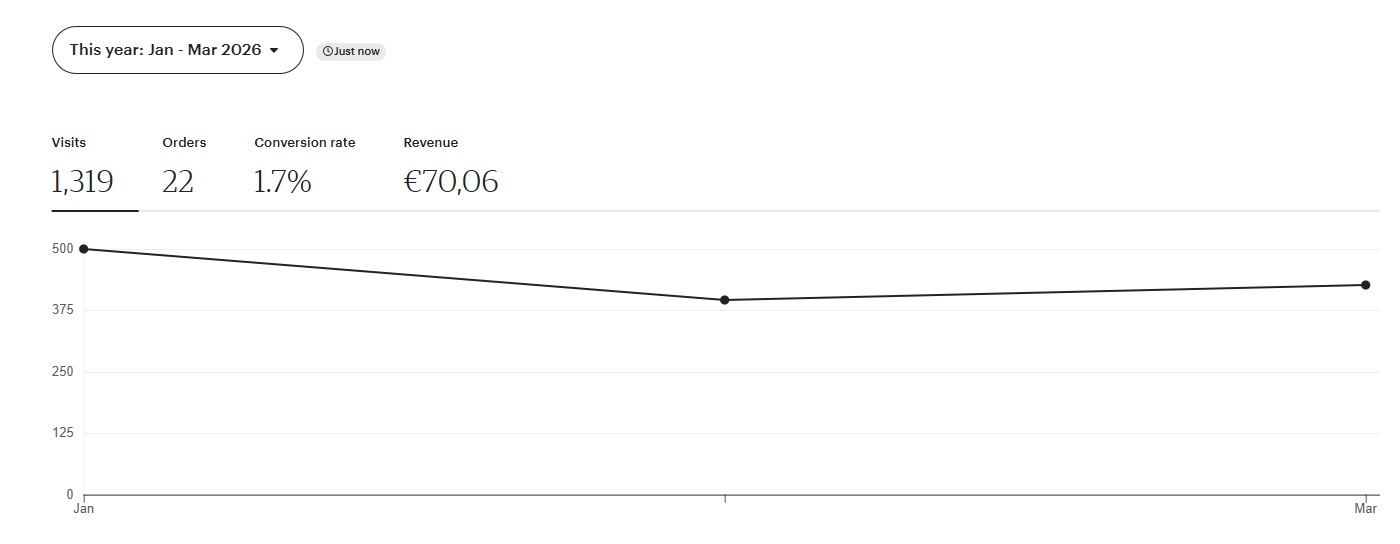
Etsy: €70 from 22 orders in Q1 2026. I haven’t uploaded new products to Etsy this year. These are residual sales from bundles uploaded in 2025, still earning without any additional work. That’s the compound effect of digital products.
What are Etsy digital products? Digital products on Etsy are files that buyers download instantly after purchase. For AI creators, the most profitable categories are SVG icon bundles, clipart sets, t-shirt designs, sticker sheets, and printable art. Buyers use these files for Cricut cutting machines, Silhouette plotters, print-on-demand products, and design projects.
Etsy’s rule for AI-made files
Etsy accepts AI images from sellers. It calls them “seller-prompted AI creations” and counts them as “designed by a seller” when you wrote the original prompts. The rule is short: you must say in your listing description that the item was created with AI. Write it in plain words, for example: “Icons generated with AI tools from my own prompts, then cleaned up and bundled by me.” Etsy does not count AI prompt bundles as seller-designed, so sell the images, not the prompts. Source: Etsy Creativity Standards, read on October 7, 2026.
Table of Contents
- Step 1: Research What Sells on Etsy
- Step 2: Pick Your Product Type
- Step 3: Write Prompts for Vectors
- Step 4: Generate and Process SVGs
- Step 5: Package Your Bundle
- Step 6: Optimize Your Etsy Listing
- Pricing Strategy
- Common Mistakes
Step 1: Research What Sells on Etsy
Etsy is a search engine for handmade and digital goods. Buyers type keywords, browse results, and purchase. Your research determines whether you create products people actually want.
Where to Find Profitable Niches
| Source | What You Learn | How to Access |
|---|---|---|
| Etsy Search Autocomplete | Real buyer search queries | Type a partial keyword in Etsy’s search bar, note the suggestions |
| Etsy Bestseller Badges | Which listings actually sell | Search your niche, look for orange “Bestseller” tags |
| eRank | Search volume, competition scores, trend data | Free plan at erank.com (5 keyword lookups a day), paid plans from $5.99/mo |
| Etsy Search Analytics / Stats | The search terms that already brought shoppers to your shop (only terms you already rank for) | Shop Manager → Stats, once your shop has traffic |
| Logo Moose | Design trends 4-6 weeks before they hit Etsy | logomoose.com/popular |
| Reddit Craft Subs | What Cricut/Silhouette users are making | r/cricut, r/silhouettecutters, r/SVGfiles |
Partner links from this table: eRank (ad).
The research method
- Start with Etsy autocomplete. Type “svg bundle” and note what Etsy suggests. Those suggestions are real searches from real buyers.
- Check bestseller badges. Search your candidate niche. If multiple listings show the orange Bestseller tag, demand is confirmed.
- Count the competition. If there are fewer than 100 listings for your exact keyword, competition is low.
- Check eRank (ad) for search volume and competition scores. The free plan allows 5 keyword lookups a day, enough to check a few bundle ideas. Basic at $5.99 a month raises that to 100 a day. If you are weighing it against EverBee, the eRank vs EverBee comparison covers which one fits which job.
- Scout Logo Moose. If a design motif is trending on Logo Moose (popular logo submissions), it typically hits Etsy buyers 4-6 weeks later. This is your first-mover advantage.
The target metric
Opportunity score = search volume / number of results. Higher means more demand relative to supply. That’s your target.
The bundle premium
The most important pricing insight for Etsy digital products: bundles usually sell better than singles.
A single icon for $0.99 sits and collects dust. A bundle of 50 matching icons for $4.99 sells consistently. Buyers want value and variety. Every product you create should be a bundle.
Seasonal Calendar
| Season | Upload By | Bundle Ideas |
|---|---|---|
| Wedding season | February | Wedding icons, floral clipart, invitation elements |
| Back-to-school | June | Teacher SVGs, school supply icons, alphabet sets |
| Halloween | August | Spooky clipart, skull designs, haunted house elements |
| Christmas | September | Holiday icons, ornament designs, winter clipart |
| Valentine’s Day | December | Heart bundles, love quotes SVG, romantic clipart |
Thirteen tags per listing is a budget you spend by hand, once per bundle, forever. AutoKeyWorder (ad, own product) is a Chrome extension that reads each image with AI vision and fills titles, keywords and categories directly inside the Etsy upload form, with no CSV export and no re-import. AutoKeyWorder runs at roughly 5 seconds per image and covers Etsy, Adobe Stock, Shutterstock, Freepik (now Magnific Contributor), Displate, TeePublic and Zedge. Install is free with 50 credits included, one credit per image, no credit card. Get the extension
Step 2: Pick Your Product Type
All Etsy vector products use one model: Recraft V4 text-to-vector. It outputs native SVG files directly. No manual tracing, no conversion headaches.
Cost: ~$0.08 per SVG via Kie.ai (ad).
The 7 Product Types
| Track | Product | Prompt Length | Best For |
|---|---|---|---|
| 1 | B&W Icon Bundles | 40-80 words | Universal icons, Cricut cutting files |
| 2 | Flat Colored Icons | 65-85 words | App icons, sticker designs, web graphics |
| 3 | T-Shirt Designs | 110-140 words | Print-on-demand, merch, Cricut iron-on |
| 4 | Vintage Badges | 80-120 words | Logos, labels, branding elements |
| 5 | Monoline Logos | 40-60 words | Minimalist branding, line art |
| 6 | Icon Grids (12 per generation) | 100-160 words | Large bundles at 12x cost savings |
| 7 | Character Mascots (4 per generation) | 100-160 words | Sticker sheets, character sets |
Start with Track 1 (B&W Icons) or Track 2 (Flat Colored Icons). They’re the simplest to produce, easiest to bundle, and have the broadest buyer base.
Step 3: Write Prompts for Vectors
Vector prompts differ from photo or poster prompts. You’re designing clean, scalable graphics, not realistic scenes.
The 6-Element B&W Formula (Track 1)
This is the foundational formula for B&W icon bundles:
1. "B&W line art icon of [subject + specific pose/view]"
2. "Simplified to [4-8] geometric shapes: [list each shape]"
3. "Commercial [clipart/fine/medium] detail level"
4. "Bold recognizable silhouette, legible at 64px"
5. "Black lines on white background, no color fills, no grey tones"
6. "[stroke weight] uniform strokes, no texture variation, all contours fully closed.
    No gradients, no shadows, no texture, no fills, no photographic elements"
Target: 40-80 words. Short and precise.
Example Prompts
B&W Icon (Dog):
B&W line art icon of a dog face viewed from the front, ears perked upright, friendly expression. Simplified to 6 geometric shapes: oval head, two triangular ears, circular nose, two oval eyes, curved mouth line. Commercial clipart detail level. Bold recognizable silhouette, legible at 64px. Black lines on white background, no color fills, no grey tones. Medium-weight uniform strokes, no texture variation, all contours fully closed. No gradients, no shadows, no texture, no fills, no photographic elements, no open paths, no decorative flourishes.
B&W Icon (Wedding Cake):
B&W line art icon of a three-tier wedding cake on a round pedestal. Simplified to 7 geometric shapes: three stacked rectangles with rounded edges, circular pedestal base, two small heart decorations, and a flower topper. Commercial clipart detail level. Bold recognizable silhouette, legible at 64px. Black lines on white background, no color fills, no grey tones. Medium-weight uniform strokes, no texture variation, all contours fully closed. No gradients, no shadows, no texture, no fills, no photographic elements, no open paths, no decorative flourishes.
Flat Colored Icon (Fox):
Clean flat vector illustration of a fox face viewed from the front. Simplified geometric forms with solid color fills and no gradients. Bold recognizable shape, legible at 64px. Warm amber face, charcoal nose and eyes, cream ear accents. Crisp clean edges, professional icon quality. Absolutely no gradients, no color transitions, no blending, no shadows, no texture, no watermark.
T-Shirt Design (Skull Crown):
Clean flat vector illustration of a human skull wearing an ornate pointed crown. Front view with bold graphic simplification. Crown decorated with geometric jewel shapes in warm amber and deep teal. Skull rendered in off-white with charcoal shadow accents defining eye sockets, nasal cavity, and teeth. Background-free isolated design. Bold outlines at 3px weight, internal detail at 1.5px. Absolutely no gradients, no shadows, no textures, no watermarks, no halftone patterns. Professional print-ready t-shirt graphic with strong silhouette readable at arm’s length.
Vintage Badge:
Vintage badge logo for an artisan coffee roaster. Circular emblem with decorative rope border. Central motif of a steaming coffee cup flanked by two coffee branches with beans. Banner ribbon across the bottom with space for customizable text. Warm amber, deep brown, and cream color palette. Bold outlines, flat fills, professional label quality. Absolutely no gradients, no color transitions, no blending, no shadows, no texture.
The Anti-Gradient Rule (Mandatory for All Colored Vectors)
Every prompt for colored vectors must include this line:
“Absolutely no gradients, no color transitions, no blending, no shadows, no texture”
Without this constraint, approximately 17% of colored vectors get gradient contamination. With it, that drops below 5%. This single line saves hours of manual cleanup.
One icon per prompt
Generate one icon at a time, then assemble into bundles manually. This gives you quality control over every piece in your bundle. The exception is Track 6 (Icon Grids), which generates 12 matching icons in a single call for cost efficiency.
Step 4: Generate and Process SVGs
Generation Workflow
- Open Kie.ai (ad)
- Select Recraft V4 text-to-vector
- Paste your prompt
- Download the SVG output
Recraft V4 outputs native SVG files. No bitmap tracing, no manual conversion.
Post-Processing
Raw SVGs from Recraft sometimes need cleanup:
Background removal: Delete the background rectangle. Most buyers need transparent SVGs.
White fill cleanup: Large white fills (over 5% of the canvas) should be deleted. Small white elements are fine.
Path merging: Small stray white shapes can be merged using the evenodd fill rule. Never use clipPath for this, as it breaks in some design tools and cutting software.
Free tool for SVG editing: Inkscape (free, open source) handles all of this. Open the SVG, select and delete background elements, save.
File formats to include in your bundle:
- SVG (required, the primary file buyers want)
- PNG with transparent background (for buyers who need raster)
- Optional: AI or EPS format for professional designers
Quality check before bundling
- Background is transparent (no white rectangle behind the icon)
- No gradient artifacts in colored vectors
- Silhouette is recognizable at 64px (zoom out and check)
- All paths are closed (no open strokes that will confuse cutting machines)
- Consistent style across the bundle (stroke weight, detail level, color palette)
Step 5: Package Your Bundle
Buyers expect a complete, professional package. Include the following:
Bundle Contents
YourBundle_Name/
├── SVG/
│   ├── icon-001.svg
│   ├── icon-002.svg
│   └── ... (all icons as individual SVGs)
├── PNG/
│   ├── icon-001.png (transparent, 2000px+)
│   ├── icon-002.png
│   └── ...
├── Preview.pdf (overview of all icons in the bundle)
└── README.txt (license terms, usage rights, contact info)
Etsy lets you attach up to five files to a digital listing, each up to 20MB, and file names can use up to 70 letters, numbers, periods, hyphens or the _ sign. A folder with 50 SVGs does not fit as loose files, so zip it. If the zip is over 20MB, split the bundle into several zips. Buyers cannot pick variations on a digital listing, so a bigger or smaller bundle needs its own listing. Source: Etsy help, How to Manage Your Digital Listings, read on October 7, 2026.
Bundle size sweet spots
| Bundle Size | Price Point | Buyer Perception |
|---|---|---|
| 20-30 icons | $2.99-$3.99 | Good value for a specific niche |
| 40-60 icons | $4.99-$5.99 | Best seller range, feels comprehensive |
| 80-100+ icons | $6.99-$7.99 | Premium bundle, perceived as complete collection |
Mockup Images
Mockup images convert browsers into buyers. Show your SVGs in context: on a t-shirt, in a frame, on a website, loaded in Cricut Design Space.
Placeit (ad) has thousands of product mockup templates. Upload your design, download a professional product image. Or use Canva’s free tier for basic mockups.
Your Etsy listing needs 5-10 images:
- Overview of all icons in the bundle (grid layout)
- Close-up of 3-4 best icons
- Mockup: icons on a t-shirt
- Mockup: icons on a tote bag or mug
- Mockup: icons in a design tool (Cricut, Canva)
- File format preview (showing SVG/PNG/PDF included)
Step 6: Optimize Your Etsy Listing
Title Structure
Etsy titles can be up to 140 characters. Front-load your keywords.
Formula:
[Count] [Product Type] [Style] [Theme] [Use Case] | [Format] | [Benefit]
Examples:
- “50 Wedding Icons SVG Bundle Minimalist Line Art Bridal Clipart | Cricut Ready | Instant Download”
- “40 Animal SVG Icons Cute Kawaii Clipart Bundle | Silhouette Cut Files | Commercial Use”
- “30 Coffee Shop Vintage Badge Logos SVG Bundle | T-Shirt Design | Print Ready”
Tags (13 Maximum)
Etsy gives you exactly 13 tags. Every single one matters. AutoKeyWorder (ad, own product) generates Etsy-optimized tags from your product images. If you want to see it on one listing before installing anything, the Etsy tag generator runs in the browser and writes the title, all 13 tags and the description from a photo.
Manual tagging strategy:
Mix these categories across your 13 tags:
- Product type tags: “svg bundle,” “clipart bundle,” “digital download”
- Use case tags: “cricut svg,” “silhouette cut file,” “t-shirt design”
- Style tags: “minimalist svg,” “line art,” “kawaii clipart”
- Theme tags: “wedding svg,” “animal icons,” “coffee lover”
- Benefit tags: “commercial use,” “instant download”
Description
Your first 160 characters show in search results. Lead with what the buyer gets.
First line: “50 minimalist wedding icon SVGs, ready for Cricut, Silhouette, and any design software. Instant download, commercial license included.”
Then cover:
- Exact file count and formats included
- A plain line that the files were created with AI tools (Etsy requires this)
- Compatible software and machines
- License terms (personal use, commercial use, or both)
- File organization (folder structure)
- How to download and use
Etsy SEO Takes Time
Etsy does not publish how long a new listing takes to settle in search, so I can’t give you a number. Don’t panic if you get zero views in the first week. Don’t rewrite your tags every few days, because then you can’t tell which change helped. Give a listing a few weeks before you adjust it.
Pricing Strategy
| Bundle Size | Recommended Price | Notes |
|---|---|---|
| 20-30 items | $2.99-$3.99 | Entry-level, impulse purchase |
| 40-60 items | $4.99-$5.99 | Sweet spot. Best volume-to-revenue ratio. |
| 80-100+ items | $6.99-$7.99 | Premium. Needs strong mockups and reviews. |
| T-shirt designs (single) | $1.99-$2.99 | Lower price, but design quality must be high |
Launch strategy: Consider offering your first listing at a slight discount to get initial reviews. Reviews are social proof, and a listing with none has less to convince a new buyer.
Free listing trick: List one small freebie bundle (5-10 icons) at the lowest price the listing form accepts. It drives traffic to your shop and builds your review count.
Common Mistakes
Selling singles instead of bundles. A single SVG icon for $0.99 has almost no perceived value. Bundle 50 matching icons for $4.99 and buyers feel like they’re getting a deal. Always bundle.
Skipping the anti-gradient constraint. Without “absolutely no gradients, no color transitions, no blending” in your colored prompts, about 1 in 6 vectors comes back with gradient contamination. Adding that one line to every colored prompt prevents hours of cleanup.
No mockup images. A listing with just flat SVG previews on white backgrounds looks amateur. Show your SVGs on t-shirts, mugs, in Cricut Design Space. Mockups are what convert browsers to buyers.
Ignoring Etsy SEO. Your 13 tags and title are your SEO. Generic tags like “svg” or “digital download” are too competitive. Specific long-tail tags like “minimalist wedding cake svg cricut” reach buyers with purchase intent.
Changing tags too quickly. Change one thing at a time and give it a few weeks. If you rewrite tags every few days, you can’t tell what worked.
Inconsistent style within a bundle. Every icon in a bundle should feel like part of the same set. Same stroke weight, same level of detail, same color palette. Mixed styles make the bundle feel thrown together.
Forgetting commercial use licensing. Most Etsy SVG buyers need commercial use rights (for their own products, Cricut projects to sell at craft fairs, etc.). State “commercial use included” in your listing. It’s a purchase driver.
Not using eRank (ad) for research. Etsy autocomplete is a start, but eRank gives you actual search volume numbers, competition grades, and trend data. The free plan caps you at 5 keyword lookups a day. Basic ($5.99/month) gives you 100 a day, keyword ideas and 5 monitored competitors.
Frequently asked questions
How much can you earn selling digital art on Etsy? A single SVG bundle at $4.99 that sells 10 times a week grosses about $200 a month before fees. I have no reliable figure for what a typical seller earns, so I won’t quote one. My own Q1 2026 result is the €70 from 22 orders shown above. On a $4.99 sale, Etsy fees come to roughly 18% with a US bank account, because the $0.20 listing fee and the $0.25 processing fee are fixed. On a $20 item they come to roughly 12%. If you are also weighing a print-on-demand marketplace, the fee math for both is in Redbubble vs Etsy.
What digital art formats sell best on Etsy? SVG bundles are the top performers for craft buyers (Cricut and Silhouette users). PNG with transparent backgrounds is the second most requested format. Include both SVG and PNG in every bundle.
How many tags should an Etsy listing have? Etsy allows exactly 13 tags per listing. Use all 13. Mix product type tags, use case tags, style tags, and benefit tags. Every unused tag is a missed search opportunity. For the data behind this, see how to choose Etsy tags.
How long does Etsy SEO take to work? Etsy does not publish a time, so treat any exact number you read as a guess. Don’t change tags every few days. Give a listing a few weeks of traffic before you adjust it.
Do bundles sell better than single items on Etsy? Usually, yes. A bundle of 50 matching icons for $4.99 gives a buyer more for the price than a single icon for $0.99. I have no measured multiple, so ignore any “5-10x” claim you see elsewhere.
Your next steps
- Research: Spend 30 minutes on Etsy autocomplete and eRank (ad). Find 3 bundle concepts with high demand and low competition (under 100 listings).
- Generate: Create 50 matching icons on Kie.ai (ad) using Recraft V4. One icon per prompt.
- Process: Remove backgrounds, clean up in Inkscape, export SVG + PNG.
- Package: Build your bundle folder (SVG + PNG + Preview PDF).
- Mockup: Create 5-10 listing images with Placeit (ad) or Canva.
- Tag: Optimize your listing with AutoKeyWorder (ad, own product).
- List: Upload to Etsy. Price at $4.99 for a 50-icon bundle. Wait a few weeks before tweaking.
← Back to AI Income Blueprint | Next: Prompt Engineering →
Part of the AI Income Blueprint series. See all modules and the full tools page.