
Disclosure: This guide contains an affiliate link to eRank (ad). I earn a commission if you buy a plan through it, at no extra cost to you. It also mentions AutoKeyWorder, which is my own product (ad, own product). Etsy pays me nothing for this guide.
If you want to know how to sell on Etsy, start with my numbers: my own shop has made EUR 372.78 from 113 orders since January 2025. It’s a small Etsy side hustle, and the last few months went down. I’m showing you the screenshot anyway because most Etsy guides are written by people who sell courses. I’d rather you see what a normal small shop looks like before you spend a weekend on this.
This guide takes you all the way from zero: what it costs, what to sell, how to open the shop, how to write a listing, and what the first month looks like. I read every fee and limit below on Etsy’s own help pages on 17 September 2026.
How to Sell on Etsy: The Short Answer
To sell on Etsy, you open a shop on a desktop browser, pay a one-time set-up fee, verify your identity, and publish your first listing. Each listing costs $0.20 for 4 months. When an item sells, Etsy takes a 6.5% transaction fee plus payment processing, which is 3% + $0.25 in the US. A new listing can take up to 48 hours to show in search.
The 7 steps, in order:
- Pick what to sell, then check that people search for it.
- Open your Etsy shop: name, country, currency, bank, identity check.
- Make the product.
- Write the listing: title, 13 tags, attributes, description.
- Add photos, set the price, and sort out delivery and payment.
- Understand how Etsy search finds a new listing.
- Watch the first 30 days, then make the next listing.
Steps 1 and 4 decide whether anybody finds you. Most beginners rush both, then spend their energy on the shop banner.
What My Own Etsy Shop Earned in 20 Months
My shop is called HappyVectors. I sell digital downloads: vector icon packs and clipart as SVG and PNG files. I opened it in January 2025, did close to nothing for six months, and got the first sales in summer 2025.
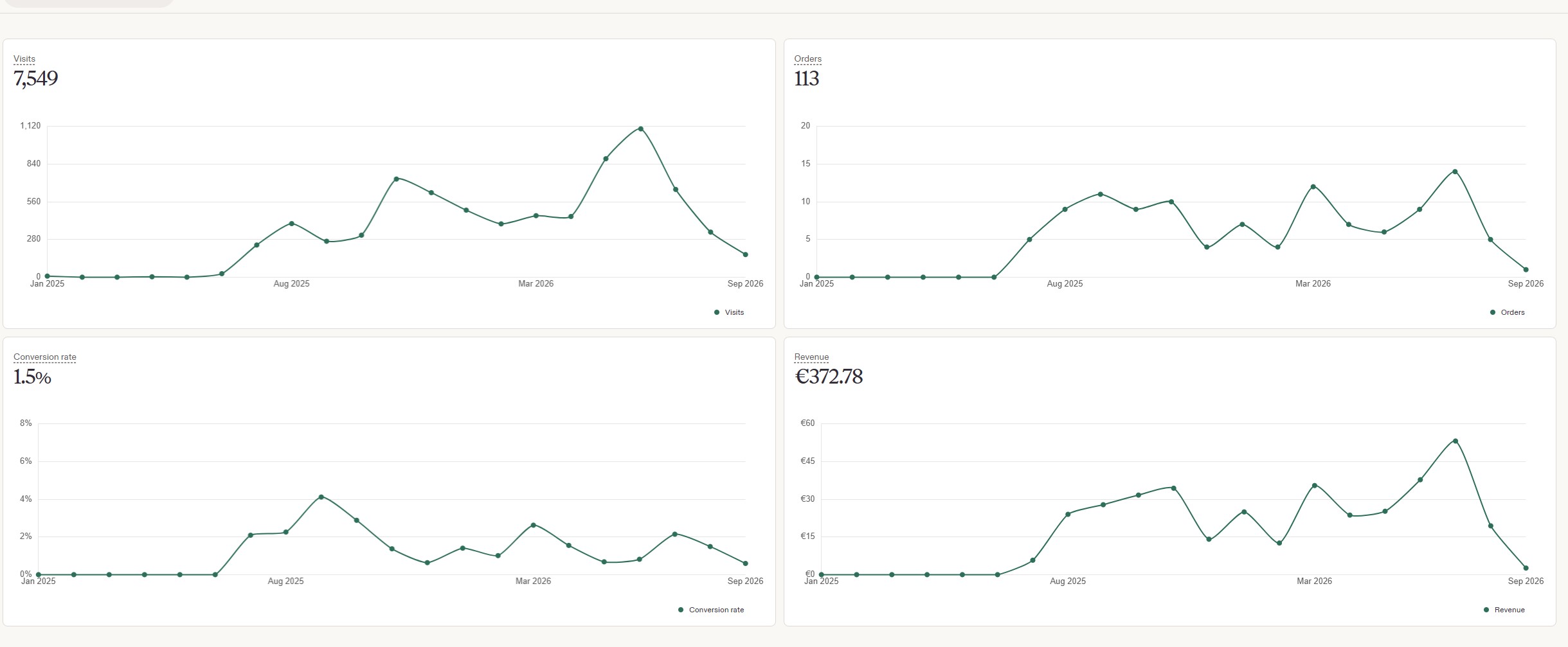
That’s the full stats page from my Etsy Shop Manager, captured on 17 September 2026 and unedited.
| What Etsy counted | January 2025 to September 2026 |
|---|---|
| Visits | 7,549 |
| Orders | 113 |
| Conversion rate | 1.5% |
| Revenue | EUR 372.78 |
Three things stand out to me in those numbers.
The average order is about EUR 3.30. That’s 372.78 divided by 113. Digital downloads are cheap products. You earn through volume and files that keep selling without new work, so you need a lot of listings before it adds up.
Roughly 1 visitor in 67 buys. That’s what 1.5% means. If a listing gets 10 visits a month, expect a sale every six or seven months from it. Traffic per listing is the number to push. On Etsy, that traffic comes from search.
The curve goes down at the end. Visits and revenue both fell over the last months on the chart. I stopped uploading for a stretch, and the shop cooled off. I can’t prove the pause caused the drop. The timing on my chart fits.
This shop pays for a few tool subscriptions and nothing more. What it taught me is where the hours go. Making a product is the fun part. The slow part is the listing form: a title, 13 tags, a description, a category and attributes, for every single product, typed by hand.
I got tired of that form, so I built a tool for it. AutoKeyWorder (ad, own product) is my Chrome extension that reads your listing photo with AI vision and fills the title, all 13 tags, the description, category and materials directly in Etsy’s listing editor, with no CSV export and nothing copied between tabs.
AutoKeyWorder installs free with 50 credits and no credit card. An Etsy listing costs 2 credits, so that covers 25 listings. You won’t need it until step 4.
Install AutoKeyWorder free, 50 credits Try 13 tags from one photo, no signup
Step 1: Pick What to Sell
Two questions decide this step. Can you make it again and again without hating it? And do people type words into Etsy search that your product answers?
For a first shop I’d pick digital products. No stock, no shipping, no returns counter in your hallway. The buyer pays, Etsy delivers the file as an instant download, and the same file can sell again tomorrow. Physical handmade goods sell at higher prices, and they’re the heart of Etsy, but each sale costs you hours and postage.
Whatever you pick, check the demand before you make anything:
- Type your idea into the Etsy search bar and read the autocomplete. Those are real searches.
- Open the top results. Check how many reviews the shops have and how recent they are.
- Look for phrases where the top listings look tired: bad photos, vague titles, old reviews.
This is where you use a keyword research tool. I use eRank (ad). Type a phrase, and it shows estimated searches, competition and the tags top listings use. The free plan gives 5 lookups a day with no card.
Here’s what sucks about it. eRank’s search numbers are estimates, and they can be far off. When I checked 5 phrases against Etsy’s own numbers on 13 September 2026, Etsy counted 1,200 monthly searches for “cat mom gift” while eRank showed 148. The interface is cluttered too. I use eRank to turn a long list of ideas into a short one, and I don’t treat its numbers as exact. The full test is in my Etsy SEO tools write-up.
Sort your product ideas before you make anything. eRank’s free plan gives you 5 keyword lookups a day, which is enough to test a first shop idea this week. Treat the search counts as rough estimates.
Once free lookups stop being enough, my eRank vs EverBee comparison covers the two big paid research tools.
What Does It Cost to Sell on Etsy?
Before you open the shop in step 2, know the bill. Etsy has no monthly fee for a standard shop. You pay per listing and per sale. These are all the fees a beginner meets, from Etsy’s help pages: the fee overview, the Etsy Payments fee table, the Offsite Ads page and the Etsy Plus page.
| Fee | Amount | When you pay it |
|---|---|---|
| Shop set-up fee | One-time, varies by country. eRank reports $15 to $29 | When you open the shop |
| Listing fee | $0.20 per listing | At publish, then every 4 months on auto-renew |
| Transaction fee | 6.5% of the order total | Per sale. The total includes shipping and gift wrap |
| Payment processing, US | 3% + $0.25 | Per sale |
| Payment processing, Germany | 4% + EUR 0.30 | Per sale. Most EU countries match this |
| Currency conversion | 2.5% | Only if listing and bank currency differ |
| Offsite Ads | 15% of the order, capped at $100 | Only on sales from an Etsy-run ad |
| Etsy Plus | $10 a month | Optional. Skip it at the start |
One number in that table is soft. Etsy’s help page only says the set-up fee “varies by location”, and the $15 to $29 range comes from eRank’s help centre. Etsy shows you the real amount before you pay.
How much does Etsy take from a $100 sale?
On a $100 sale with no shipping charge, a US seller pays $9.95 in Etsy fees and keeps $90.05. That’s $0.20 for the listing, $6.50 for the 6.5% transaction fee and $3.25 for payment processing. If the sale came through Offsite Ads, Etsy takes another $15, and you keep $75.05.
| Line | Normal sale | Sale through Offsite Ads |
|---|---|---|
| Item price | $100.00 | $100.00 |
| Listing fee | $0.20 | $0.20 |
| Transaction fee, 6.5% | $6.50 | $6.50 |
| Payment processing, 3% + $0.25 | $3.25 | $3.25 |
| Offsite Ads, 15% | none | $15.00 |
| You keep | $90.05 | $75.05 |
A cheap product looks worse because the fixed parts weigh more. On a $5 digital download, the same US fees come to about $0.93, so you keep about $4.07. I calculated that from the same Etsy fee rates as the table above: $0.93 of $5 is 18.5%, against $9.95 of $100, which is about 10%.
About Offsite Ads: under $10,000 in sales over any 365 days, you can switch them off in your shop settings. Once a shop crosses $10,000, the fee drops to 12% and Etsy makes it mandatory for the life of the shop. As a beginner I’d leave them on. You only pay when the ad produced a sale.
Step 2: Open Your Etsy Shop
You need a desktop browser for this. Etsy’s shop opening guide says the set-up flow doesn’t run in the app. Here’s the flow:
- Create an Etsy account, or sign in to your buyer account.
- Set your shop preferences: language, country and currency. Pick the language with care. Etsy says you can’t change the shop language later.
- Choose a shop name, 4 to 20 characters, no spaces.
- Create your first listing. Etsy wants one before the shop can open. A rough draft is fine. You can edit it later.
- Add your bank account for payouts.
- Add a card and pay the one-time set-up fee. New sellers in Germany, Austria and the Netherlands must put a card on file.
- Verify your identity. Etsy uses a service called Persona: a photo of your ID and a selfie.
- Turn on two-factor authentication. Etsy requires it for sellers.
Plan an hour. The identity check is where people get stuck, usually because of a blurry ID photo. Do it in daylight.
Don’t burn a week on the shop name. In my stats, buyers arrive through product searches. I’ve yet to see one search for my shop name. Pick something short you can say out loud, and move on.
Step 3: Make the Product, and Disclose AI if You Used It
One rule covers everybody: make a small batch first. Five listings teach you more than one perfect listing because you’ll see which one gets visits.
If you can’t draw, you still have options. Beginner-friendly digital products include printable planners and wall art laid out in a free design tool like Canva, clipart sets, and SVG cut files. An SVG is a line-art file that cutting machines like Cricut read. For shirts, I wrote up how to make AI t-shirt designs and sell them on Etsy, and my guide to selling SVG bundles and clipart goes through a full product line file by file.
For HappyVectors I make icon sets with AI image tools, then vectorize them by hand so the SVG files are clean. If AI is part of your process too, know Etsy’s rule. Etsy puts every item under one of four labels: made by, designed by, handpicked by or sourced by a seller. AI work belongs under “designed by”, and Etsy’s Creativity Standards help page says:
Seller-prompted AI creations must disclose the use of AI.
I put it near the top of the listing description, in plain words. Buyers of clipart don’t mind. Buyers who feel tricked leave bad reviews.
For digital files, Etsy allows up to 5 files per listing at 20 MB each. Put a big bundle into a ZIP file. Many sellers with bigger bundles upload a PDF that links to a download folder.
Step 4: Write the Listing: Title, 13 Etsy Tags, Attributes
This is the metadata step. Metadata is the words attached to your product: title, tags, category, attributes, description. Etsy search reads them to decide which searches your listing can appear in. A great product with lazy tags is invisible. My Etsy tags guide goes deeper on the 13 tags.
These are the limits from Etsy’s help pages on creating a listing, tags and digital files:
| Field | Limit | What I do with it |
|---|---|---|
| Title | 140 characters. Etsy suggests under 15 words | Product name first, in buyer words |
| Tags | 13 tags, 20 characters each | Use all 13, as phrases |
| Attributes | Depends on category | Fill every true one |
| Photos | Up to 20 | First photo decides the click |
| Videos | Up to 2, each 5 to 15 seconds | Nice to have, skip at the start |
| Digital files | 5 files, 20 MB each | ZIP the bundle |
Attributes are the dropdowns Etsy shows for your category, such as colour, occasion or file type. Etsy’s Keywords 101 handbook article says categories and attributes act like tags, so fill them in.
For the 13 tags, think of 13 different ways a buyer might describe the product. What it is (“christmas svg bundle”), who it’s for (“teacher gift idea”), what they’ll do with it (“cricut cut file”), the style (“hand drawn clipart”), the occasion. Phrases beat single words because “svg” alone competes with millions of listings. A tag that repeats your category or an attribute wastes a slot, since Etsy already matches on those.
The title follows the same logic. Lead with the plain product name. Skip strings like “SVG, svg bundle, svg files, SVG for Cricut” that sound like a robot wrote them. Etsy’s own guidance now points to short, clear titles.
This is the form I built AutoKeyWorder for. It looks at the listing photo and fills title, tags, description, category and materials inside the Etsy form. The AutoKeyWorder Etsy page shows each field. I still read every field before I publish, and you should too. A tool doesn’t know your product was made for left-handed knitters unless the photo shows it.
Step 5: Photos, Price, Delivery and Getting Paid
Photos. The first photo is your ad in the search results. For digital products, show the files in use: the icons on a mug, the clipart on a card. That kind of picture is called a mockup, and free mockup templates in Canva are enough to start. A white page with 50 tiny icons doesn’t get clicked.
Price. Look at the first page of results for your main phrase and price in the middle. Going cheapest rarely works because on a $3 item, Etsy’s fees eat a quarter of the price. I’d rather sell a bigger bundle at $5 to $8 than a tiny one at $2.
Delivery. Digital items need nothing from you. The buyer gets the download right after payment. For physical items, Etsy’s search help page says free shipping matters for US shoppers and that US domestic shipping priced under $6 gets priority in search. If you ship physical goods inside the US, build the postage into the item price where you can.
Tax. For automatic digital downloads, Etsy collects and remits VAT for buyers in the EU, the UK and several other countries. The buyer pays it on top, and you don’t add it to your price. Your own income tax is still your job. Ask a local tax advisor once, early. It’s cheaper than guessing.
Getting paid. Etsy Payments collects the money and pays it out to your bank account on a schedule you pick: daily, weekly, every two weeks or monthly. Fees come off your balance first.
Step 6: How Etsy Search Finds a New Listing
Etsy says a new listing can take up to 48 hours to appear in search. After that, Etsy’s shop opening guide names what search weighs:
- Relevancy. Do your title, tags and attributes match the words in the search? Step 4 decides this.
- Listing quality. How well the listing does once shoppers see it.
- Customer and market experience. Reviews, a return policy, a shop logo and answered messages.
- Shipping price, for physical goods sent to US buyers.
For a new shop, relevancy is the one lever you fully control on day one. The other signals grow with sales. That’s why listing text matters more for a beginner than it does for a shop with 5,000 reviews.
Step 7: The First 30 Days
Expect quiet. My shop had zero sales for its first six months, partly because I barely had listings. Knowing what I know now, I’d spend month one like this:
- Publish 10 to 20 listings. Each listing is a separate lottery ticket in search.
- Check Shop Manager stats once a week. Look at which search terms brought visits. My Etsy SEO guide shows what 644 of those terms taught me about tags.
- Views and no sales: rework the first photo and the price. No views: rework the title and tags.
- Keep adding. My stats curve fell when I stopped uploading.
Other download marketplaces work the same way. My phone wallpaper guide shows the same pattern on Zedge and Gumroad: steady uploads, small sales, slow compounding.
What Is the Downside of Selling on Etsy?
The main downsides of selling on Etsy are stacked fees, heavy competition in every popular category, and dependence on Etsy’s search, which you don’t control. Low-priced items suffer most because the $0.20 listing fee and the fixed $0.25 processing fee weigh heavier on a $5 sale than on a $100 sale. In my two worked examples above, built on Etsy’s published fee rates, the fees ran from 10% on the $100 sale to 25% once Offsite Ads applied.
From my own shop, I’d add two more:
- It’s slow. 113 orders in 20 months.
- It needs feeding. Traffic dropped when I paused.
One more: your customers live on Etsy’s platform, under Etsy’s rules. If the shop grows, start an email list or your own site beside it. And if you’re still choosing a marketplace, Redbubble vs Etsy has the money math for designers.
Do I Need an LLC to Sell on Etsy?
Etsy doesn’t ask for an LLC (limited liability company) or any other company form to open a shop. Its set-up flow asks for a bank account, a payment card in some countries and an identity check, and none of those steps needs a business entity. Whether your city, state or country wants a business registration or licence for a side income is a local law question.
In the US, plenty of small sellers start as sole proprietors and revisit the question when real money comes in. In Germany, where I live, regular selling means registering a trade (Gewerbe), which is a short form at the local office. I have no legal training, so treat this as a pointer. One hour with a local advisor settles it.
What I Actually Do for One New Listing
My routine for a new HappyVectors pack, start to finish:
- Research, 30 minutes. I run a handful of phrase ideas through eRank to sort them, then look at Etsy’s own search results for the finalists.
- Make the pack. Generate the icons, pick the good ones, vectorize by hand, export SVG and PNG, ZIP it.
- Listing images. Make mockups that show the icons in use. The first image gets the most time.
- The listing form. AutoKeyWorder fills title, 13 tags, description, category and materials from the first image. I read every field, fix what the photo couldn’t tell it, and add the AI disclosure line.
- Publish, then leave it for two weeks before I judge anything.
Don’t wait for the perfect product. Open the shop this weekend, publish five listings, and let the stats page tell you what to make next. My numbers are small, and they’re still the most useful thing I own for deciding what to make.